
1Introduction
A beverage POS system has to capture a customer’s preferences quickly and turn them into an accurate production instruction. Temperature, sweetness, ice, milk, toppings, size and extra shots may all change the price or the way a drink is made. The system must also help staff move the order from payment to cup preparation and pickup without losing the customer’s name or requested changes.
That makes beverage POS selection different from choosing a general checkout screen. A café, tea shop, juice bar or mixed restaurant needs a menu model that staff can understand during a rush, a label or ticket workflow that the bar can trust, and reporting that explains which combinations are profitable and difficult to produce. This guide shows how to evaluate those requirements while keeping integrations, hardware and local rules subject to confirmation.
2Define the drink service model first
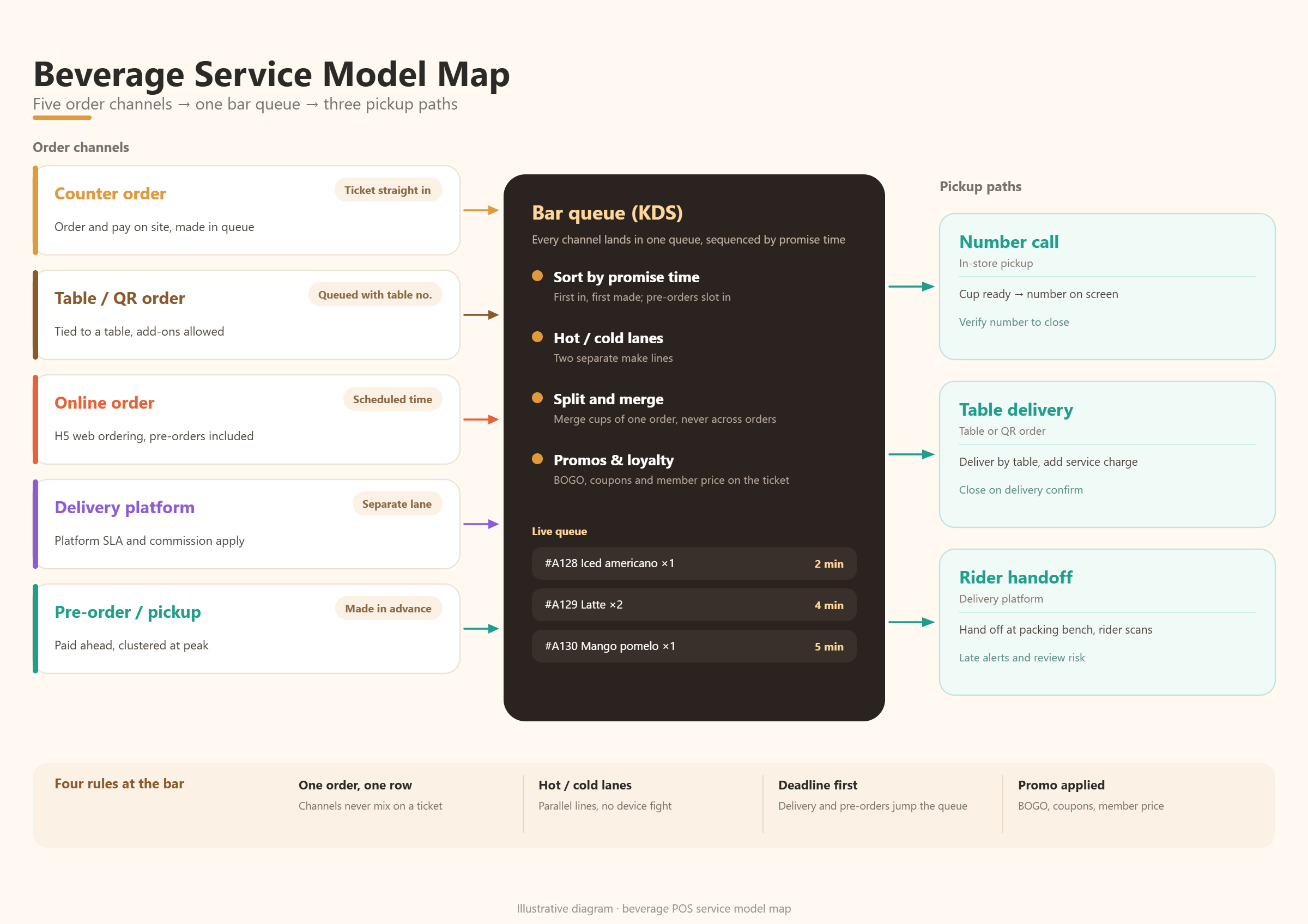
Start by mapping how a drink is ordered and received. A counter café may take payment first and call a number when the cup is ready. A tea shop may print a label with a name, temperature and a long list of options. A restaurant may send beverages to a bar while food goes to a kitchen. A delivery or preorder channel may need a promised pickup time instead of a queue number.
List the modes that operate in one shift: counter, table service, QR ordering, kiosk, mobile ordering, delivery, pickup shelf and catering. Then identify which information must stay consistent across them. If a drink is unavailable, does the change reach every channel? If a modifier has a price, does the same rule apply online and at the counter?
3Build modifiers that match how staff think
Modifiers are the core of beverage POS design. Organize them in the sequence a staff member naturally asks: size, temperature, base or milk, sweetness, ice, toppings, flavour, caffeine and special instruction. Required choices should be obvious, while optional choices should not interrupt a simple order.
Use plain names and consistent rules. “Large” should mean the same thing wherever it appears. “Less ice” should not be confused with “no ice,” and an extra shot should have a clear price and production note. Where a modifier is not relevant to a drink, hide it or keep it out of the workflow rather than asking staff to reject it manually.
Test combinations that create risk: a large iced drink with several toppings, a hot drink with an allergy note, a combo with a drink substitution and a discounted add-on. The POS should show the final order clearly before payment and preserve the same detail on the bar ticket or cup label.
4Separate customer choice from production instruction
A customer-facing name and a bar-facing instruction are related but not identical. “Oat milk” may need to print as a clear ingredient instruction. “Half sweet” may need a shorthand understood by the team. A good system lets the business define what the guest sees, what the cashier selects and what the production station receives.
Ask whether modifiers can carry production notes, allergens or routing rules. A topping may go to one station, a blended drink to another and a packaged snack to a separate area. The goal is to reduce interpretation at the bar. If staff must read a long free-text note for every drink, the menu model is probably doing too little work.
5Evaluate cup labels and ticket readability
Labels are a physical interface between the POS and the person making the drink. The label should identify the item, customer or order number, dining option, modifiers and timing information that the station needs. It should remain readable when several cups from one order arrive together.
Test the label with real edge cases: two drinks with similar names, a long modifier list, a reordered item, a remake and a delayed pickup. Check font size, line breaks, abbreviations, printer speed and the order in which labels leave the printer. If the system supports configurable fields, decide which information is essential and which creates clutter.
A label is useful only when it matches the workflow. A queue-number café may need a large number and pickup status. A delivery operation may need a customer name, promised time and channel. A table-service restaurant may need table and seat context instead. Choose the label design after mapping the service model.
6Route drinks to the right station
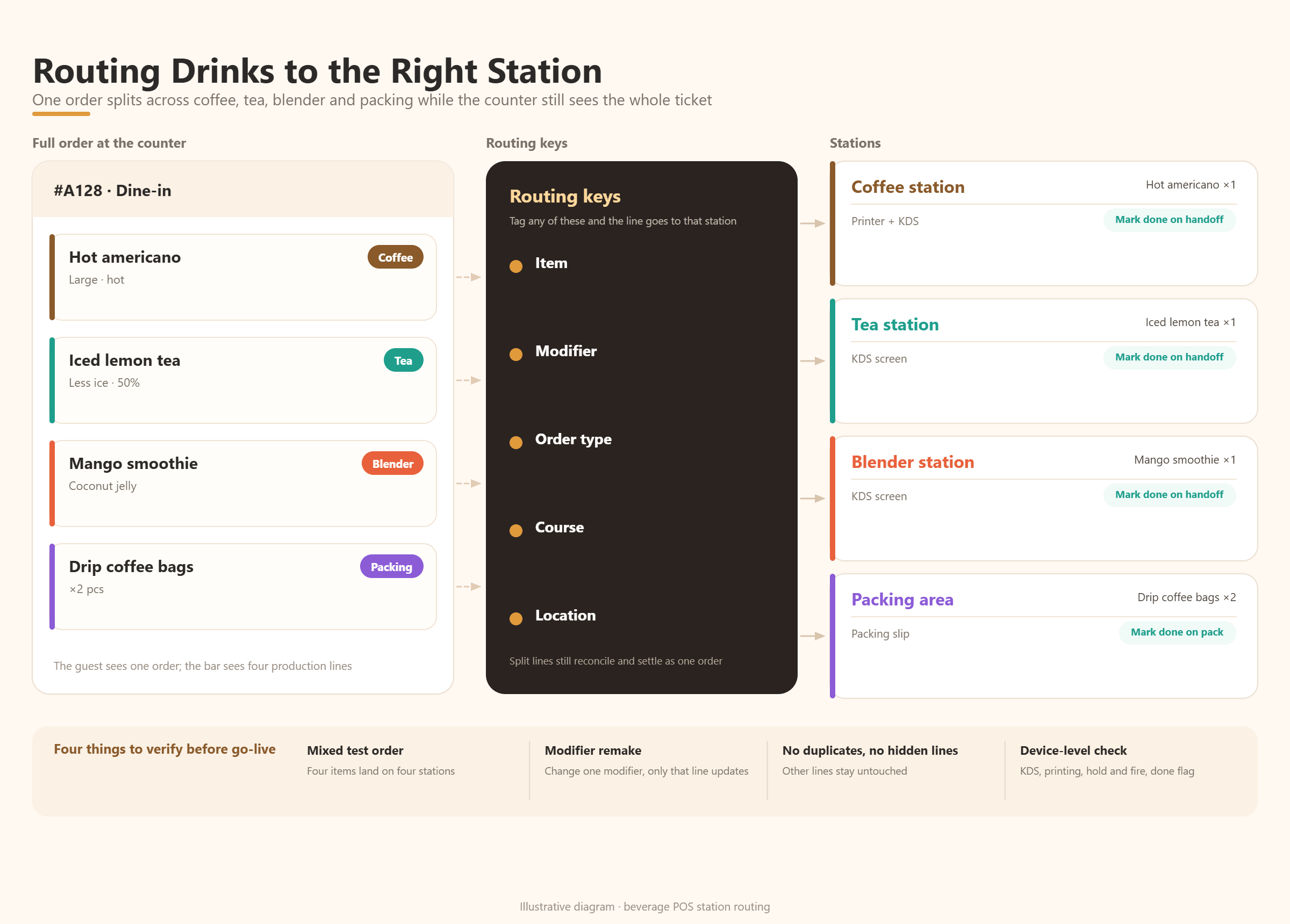
Beverage operations often combine espresso, tea, blended drinks, toppings, bakery items and packaged goods. The POS should route each line to the station that can complete it, while keeping one order visible to the front-of-house team. Test whether routing is based on item, modifier, order type, course or location.
Use a mixed test order. Send one hot coffee to espresso, one iced tea to the tea station, one smoothie to the blender and one packaged item to the packing area. Then change a modifier and remake one drink. The correct line should update without duplicating or hiding the rest of the order.
Kitchen display and printer claims need a device-level test. Confirm what hardware is supported, where tickets queue, who can hold or fire an item and how a completed drink is marked. The exact configuration may depend on the selected edition, devices and project scope.
7Connect pickup, queue and customer communication
Pickup is part of the transaction, not an afterthought. Define how staff call an order, how a customer knows it is ready and how a delayed or abandoned order is handled. A screen, printed number, SMS or other notification may be involved, but the POS must keep one source of truth for order status.
Test pickup for counter, mobile and delivery orders. Check whether the customer name, order number, promised time and channel remain visible at the bar and pickup point. If an order is split or partially completed, confirm what the customer sees and how staff avoid handing over the wrong cup.
For table service, the handoff may be different: a drink can be marked served while the food remains open. For a high-volume café, the key is a fast queue. For a preorder business, the key is timing. The system should be evaluated against the actual promise made to the customer.
8Test pricing, combos and availability rules
Beverage menus combine base prices with size premiums, paid modifiers, bundles, promotions and sometimes deposit or packaging charges. Build a pricing matrix before configuration. Include regular, seasonal, discounted and channel-specific prices, and define what happens when a topping or cup size is unavailable.
Availability should be easy to change without deleting history. A shop may run out of a syrup, a milk type or a cup size during a shift. Ask whether a manager can pause the right option, whether the change reaches online channels and whether the report still identifies what was sold.
Run the same price and availability test through every order channel. Differences between counter, QR, online and delivery menus create refunds and staff work. If a connector or custom rule is required, record that dependency instead of treating it as a standard feature.
9Link beverage sales to inventory and cost control
A beverage POS can produce better operating data when menu choices connect to ingredients and packaging. The depth required depends on the business. A small café may track finished items, while a drink chain may need recipes, ingredient usage, toppings, cups, lids, transfers and waste.
Ask how a sale affects stock and whether a recipe or bill of materials can represent size and modifier differences. Check how substitutions, staff drinks, remakes and wastage are recorded. A report that shows topping sales without the related ingredient usage may not answer the cost question.
Use a small but realistic test: one drink, two sizes, two paid toppings, one substitution, one remake and one waste event. Follow the quantities and costs through the selected configuration. Confirm which inventory and cost functions are standard, configurable or dependent on another module.
10Compare vendors with beverage scenarios
Official competitor materials show why beverage workflows deserve specific testing. Toast documents coffee-shop menu structures with temperature, milk, syrup and extra-shot modifier groups, and describes item labels that can include modifiers and guest details. Square documents customizable modifiers and rules for required choices. Lightspeed describes drinks menus with variants, options and modifiers, plus layouts for café and quick-service work.
These sources are useful category references, not proof that every vendor works the same way in your market. Ask each shortlisted provider to demonstrate one complex customized drink, one simple repeat order, one out-of-stock modifier, one label, one remake and one pickup handoff. Use the same test data and record steps, errors and recovery time.
Score the evidence across menu design, speed, label readability, production routing, pickup control, pricing, inventory, reporting, hardware, local payment and implementation effort. Mark each item as demonstrated, documented, configurable, custom, partner-dependent or unconfirmed.
11Where KunnPOS may fit
KunnPOS product materials describe beverage-related scenarios such as sweetness, ice, add-ons, cup labels, calling numbers and pickup or takeaway workflows. Those references make KunnPOS relevant for a requirements discussion where drink customization and handoff control are central.
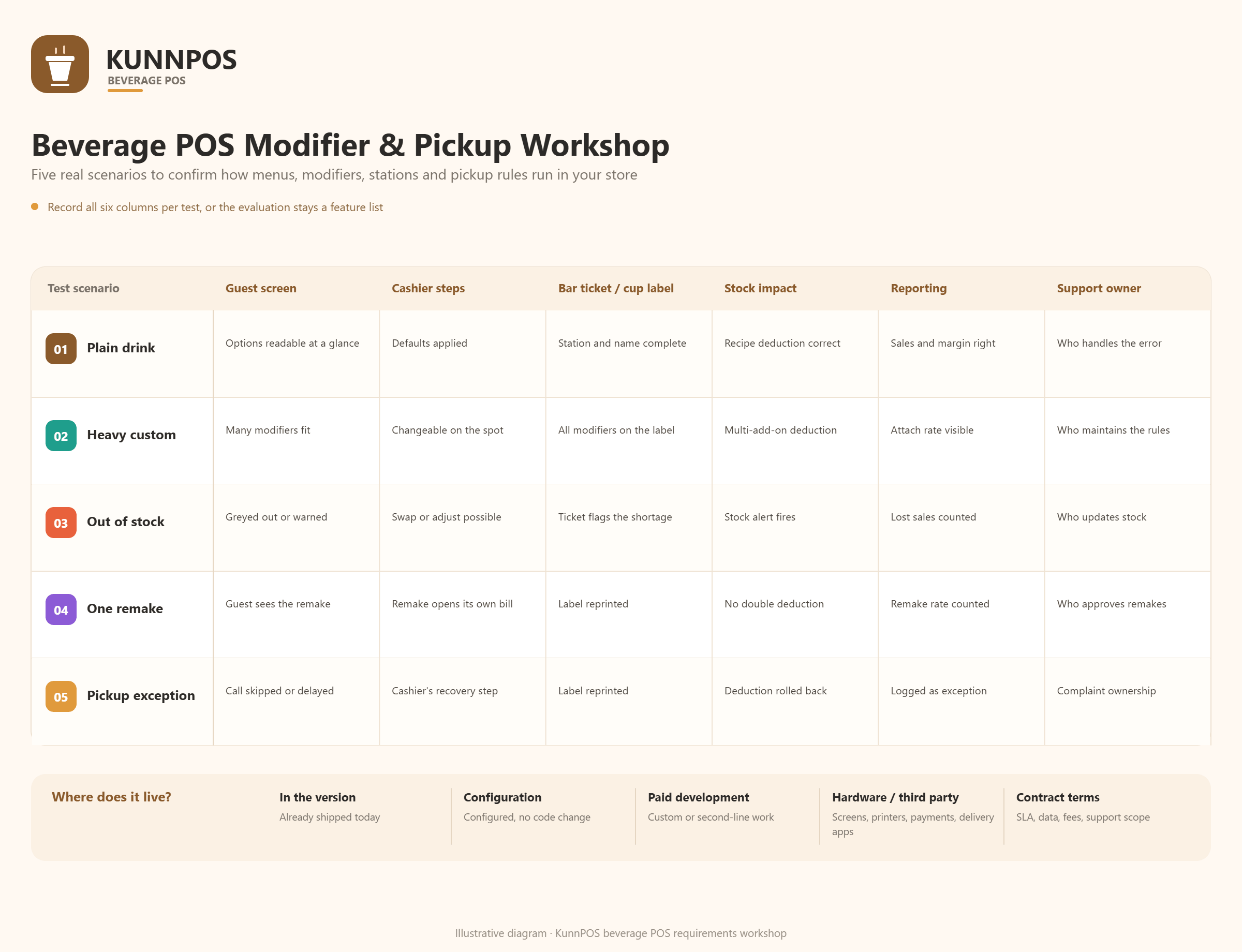
The correct question is how the selected configuration would support the actual drink menu, devices, production stations, payment methods and local requirements. Confirm which functions are available in the chosen edition, which need configuration or paid development, and which depend on hardware, third-party services or contract terms.
A practical workshop should map one regular drink, one highly customized drink, one unavailable ingredient, one remake and one pickup exception. Record the expected customer view, cashier steps, bar ticket or label, inventory effect, report output and responsible support party. This keeps the evaluation grounded in the beverage operation instead of a generic feature list.
12Frequently Asked Questions
13What makes a beverage POS different from a general restaurant POS?
A beverage POS must handle frequent customization, clear production instructions, cup labels or tickets and fast pickup. A restaurant platform may support these workflows, but they still need to be configured and tested for the drink operation.
14How should I organize drink modifiers?
Group them in the order staff asks for them, such as size, temperature, base, sweetness, ice, toppings and special instructions. Use required choices where they prevent mistakes and keep optional choices from slowing simple orders.
15Do cup labels need to include every modifier?
They should include every detail the production team needs to make and identify the drink. Other information may remain on the receipt or back-office record if printing it would reduce readability.
16How can I test pickup and queue handling?
Use counter, mobile, delivery and preorder examples. Test a normal completion, a delayed order, a remake and a partial completion, then confirm that the customer-facing status and staff workflow remain clear.
17Can KunnPOS support a customized beverage menu?
KunnPOS materials describe beverage workflows and related settings. Actual suitability depends on the selected configuration, hardware, integrations, project scope and contract, so the menu and production scenarios should be demonstrated before launch.
18Conclusion
The best beverage POS system turns customer preferences into a fast, readable and controllable production flow. Modifiers, labels, routing, pickup, availability, pricing and inventory all need to work together. A system that looks flexible on a feature page can still create friction if the bar cannot read the ticket or the customer cannot tell when an order is ready.
Use the same drink scenarios for every vendor and document what is demonstrated, configurable, custom or still unconfirmed. If you are evaluating a café, tea, juice, beverage or mixed restaurant operation, KunnPOS can help map the requirements and define the next validation steps.