
1Introduction
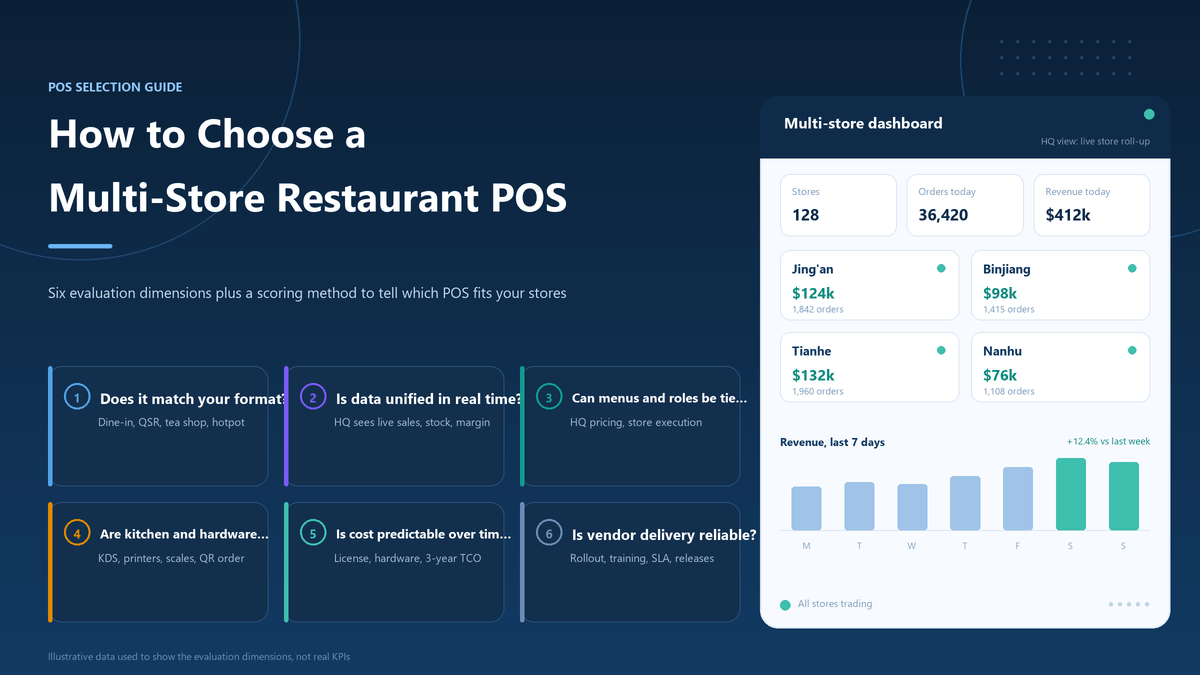
A multi-location restaurant POS system has to do more than record payments. It must give a restaurant group a reliable way to standardize menus, control permissions, route orders, reconcile sales and compare locations while allowing each branch to handle local hours, prices and operating conditions.
That is why choosing a system by its feature count is risky. A product may have a long list of modules and still create duplicate menus, unclear ownership, weak kitchen handoffs or reports that cannot be compared. The better approach is to define the operating model first, then test whether each vendor can support it with the right configuration, integrations and implementation responsibility.
This guide explains the questions restaurant owners, operations managers and POS partners should ask before selecting a multi-location restaurant POS system. It uses public product information from Toast, Square, Lightspeed and Odoo as competitor reference points, while treating every vendor claim as something to validate in a live demonstration and written proposal.
2Map the operating model before you compare vendors
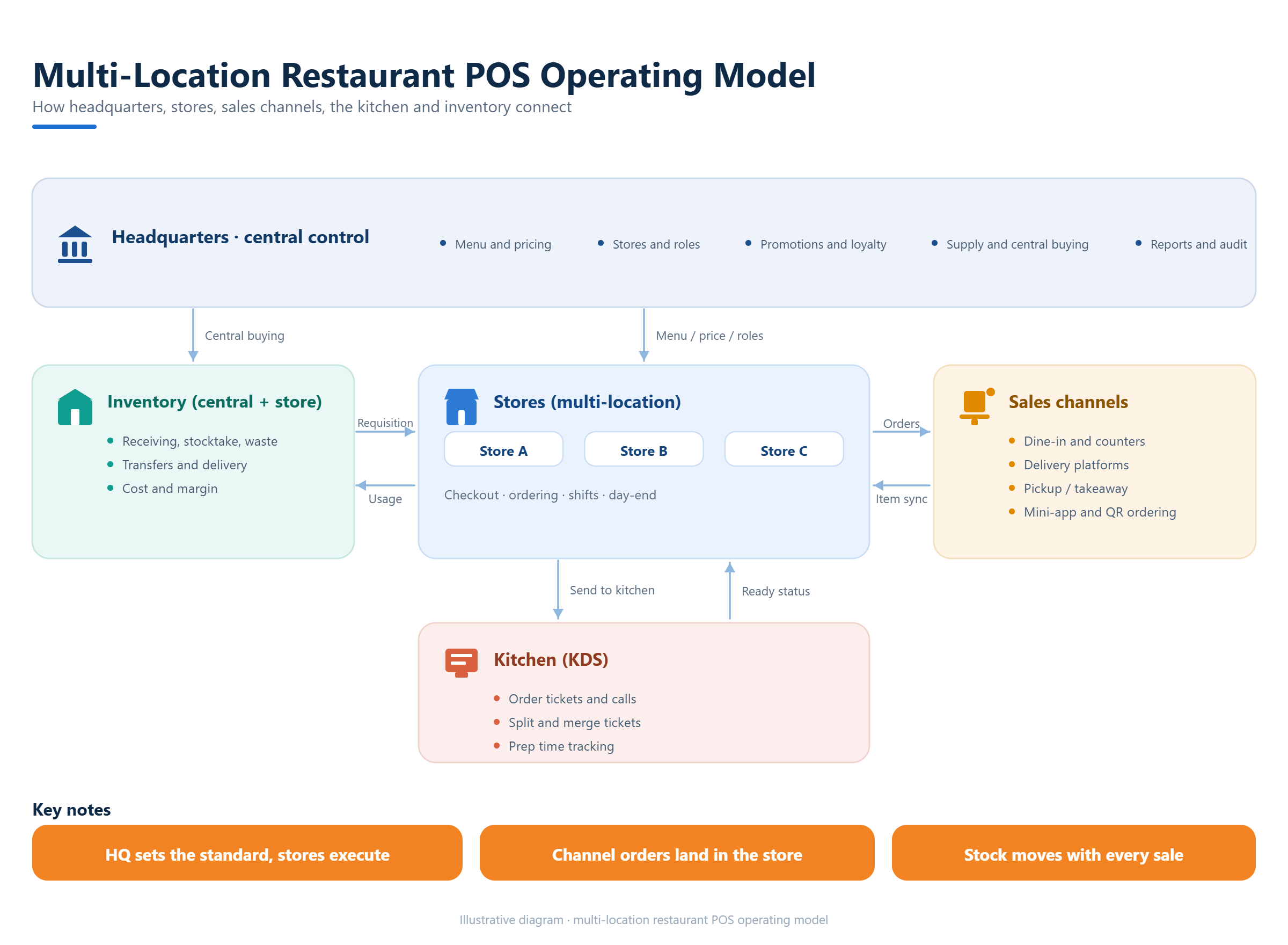
Start with the way the group actually operates. List the number of locations today, the locations planned within the next 12 to 24 months, the restaurant concepts involved, and which decisions belong at headquarters or at store level. A single-brand quick-service group may need one master menu with controlled local exceptions. A group with several concepts may need shared reporting but separate menus, pricing and prep stations.
Then map the transaction paths. Include dine-in, takeaway, delivery, QR ordering, self-ordering, table service, bar tabs, split bills and any catering or pre-order flow that matters to the business. Do not assume that a vendor’s restaurant label covers every flow. Ask the vendor to show the exact path from order entry to payment, kitchen production, refund and end-of-day reconciliation.
Finally, write down the non-negotiable operating rules. Examples include who may change a price, whether a branch can pause a sold-out item, how a manager moves an order between tables, which reports the finance team needs, and what must happen when the internet is interrupted. These rules become your evaluation script.
3Test menu governance and local flexibility
Menu management is where multi-location projects often become difficult. A useful system should let the group maintain a controlled master menu while making deliberate local changes. Test whether a central user can publish a new item, price or modifier to selected locations, and whether a location manager can change local availability without silently changing the group standard.
Check how the system handles versions and timing. Ask whether menu changes can be scheduled, whether locations can use different tax rates or service charges, and whether the audit trail records who changed what and when. If the group operates breakfast, lunch and dinner menus, verify the time rules with a realistic day and a real device rather than a slide in a sales presentation.
Competitor pages make this need clear. Toast describes centralized menu, reporting and operational settings for multiple locations. Square documents menu assignment across locations and channels. Lightspeed describes shared settings and menu items between locations. These references show the category expectation; they do not prove that a specific configuration will match your business. Include the test in the written scope.
4Follow the order from guest to kitchen
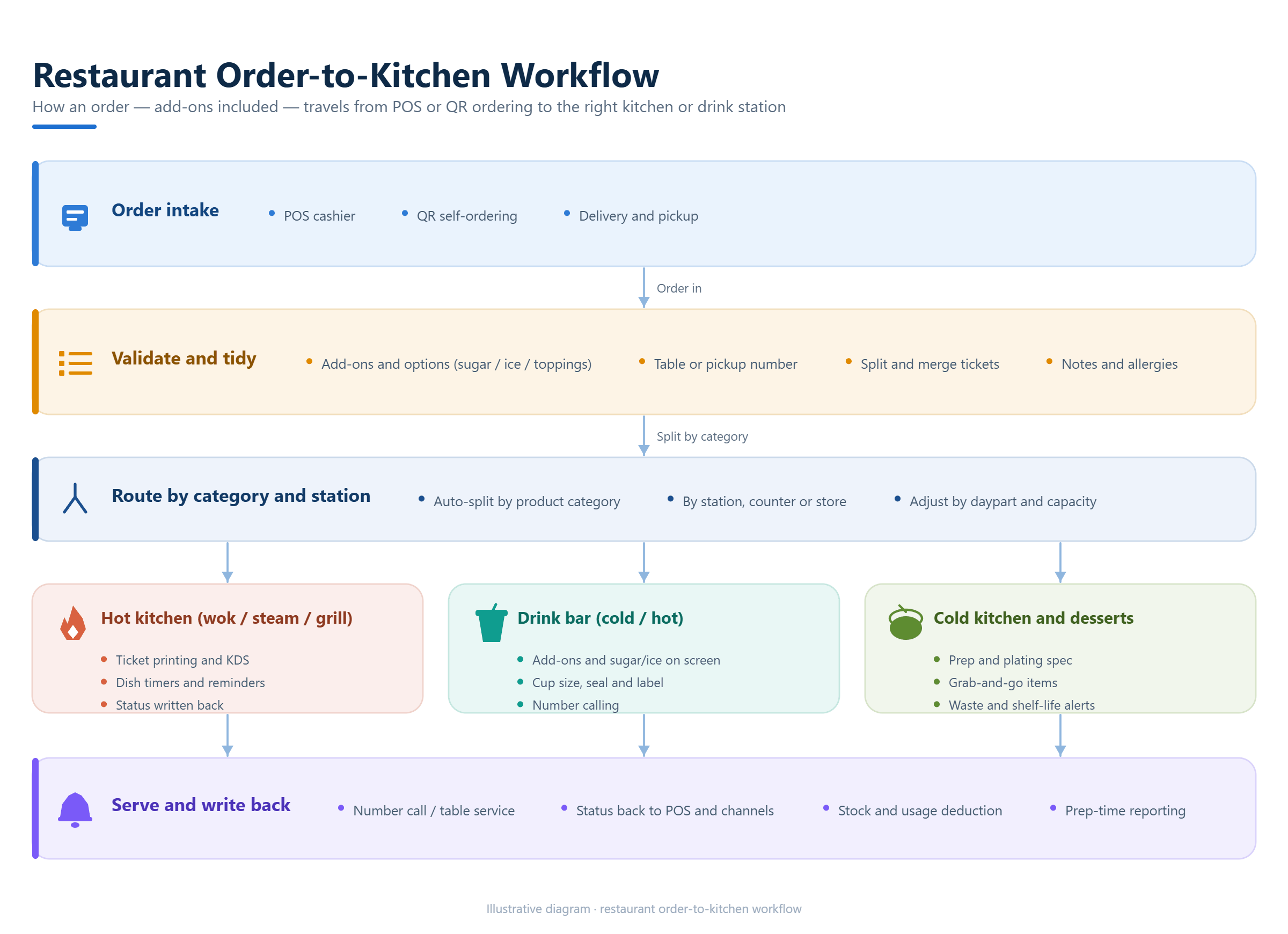
A restaurant POS should reduce handoff errors between the front of house, ordering channels and production areas. During a demonstration, place an order with modifiers, an allergy note, a course sequence and a split payment. Watch where each detail appears, which printer or kitchen display receives it, and whether staff can correct it without creating duplicate tickets.
For table service, test table maps, room or area setup, opening and closing tables, transfers, merges, split checks and reservations if those are part of the operation. For quick service and beverage concepts, test queue numbers, cup labels, pickup status, sweetness or ice modifiers and the treatment of out-of-stock items. These small details determine whether a system fits the real pace of a shift.
Ask how different locations can use different prep stations or workflows while the group keeps shared reporting. A system that forces every branch into the same kitchen layout may be simple to configure but expensive to operate. The right question is whether the platform supports a common process with controlled local configuration.
5Check payments, taxes, devices and offline behavior
Payment suitability depends on the market and the project. Ask which payment methods are supported in the target country, who contracts with the payment provider, how refunds are handled, and whether the POS sends the right tax and receipt information. A statement that a platform can integrate through an API is a starting point for evaluation, not proof that a local payment or fiscal connection is ready for production.
Document the device plan. List the required terminals, handhelds, printers, kitchen displays, customer displays, cash drawers, scanners and weighing devices. Then identify which components are standard, which are optional and which require a local partner. A multi-location system is only useful when the same order and reporting rules work across the hardware that each location can actually maintain.
Test the loss-of-connectivity procedure. Ask what can continue offline, what data is stored locally, how duplicate transactions are prevented and how records are reconciled after reconnection. Product materials from many POS vendors describe offline selling, but the exact limits are version, device and payment dependent. Treat the recovery test as an acceptance criterion.
6Inspect inventory, recipes, transfers and waste
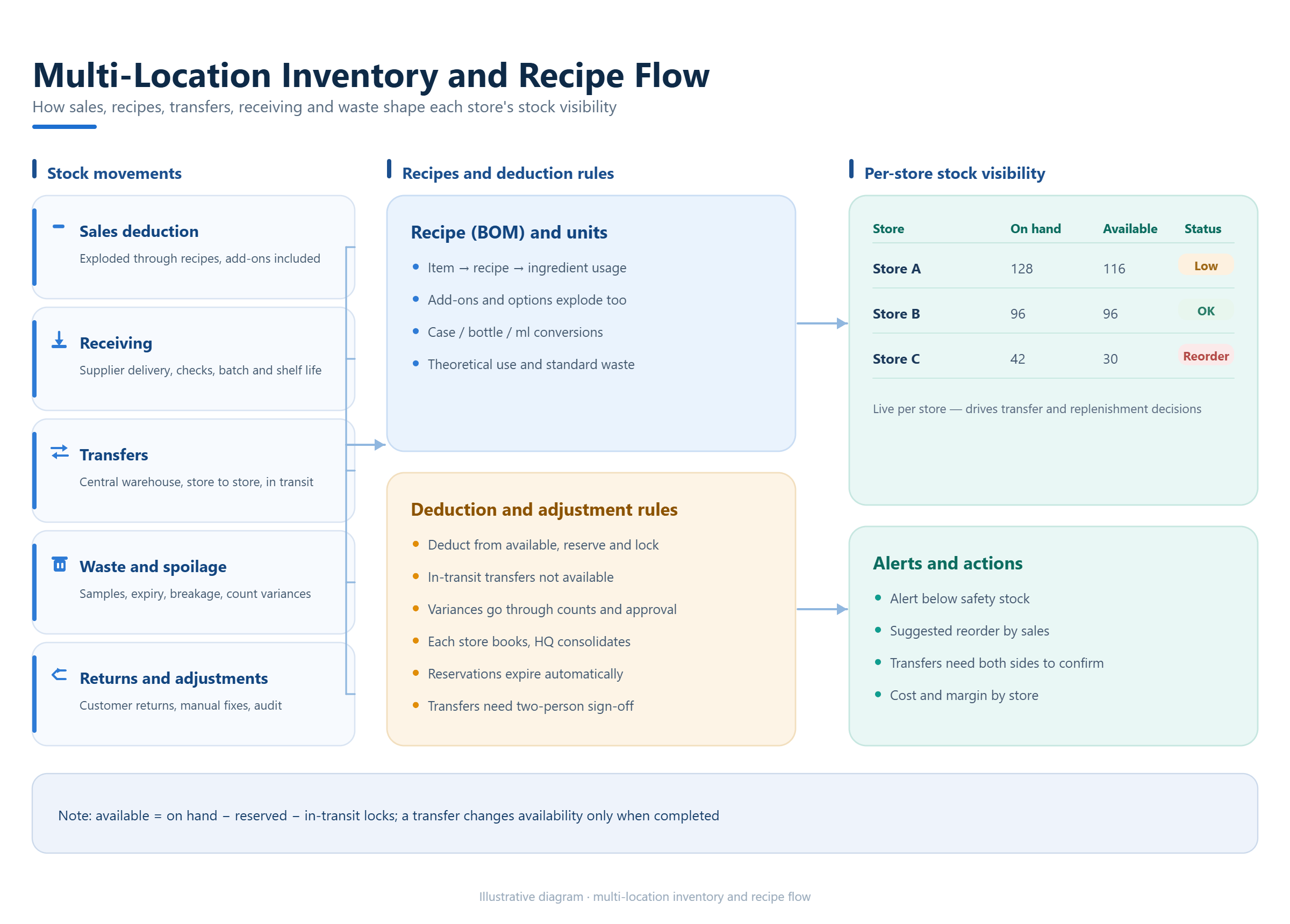
Restaurants need more than sales totals. If the group tracks ingredients, recipes or production, ask how a sale reduces stock, how a recipe or bill of materials is maintained, and how substitutions or portion changes are recorded. Beverage businesses may also need modifiers, cup or label printing and ingredient-level controls.
For several locations, examine transfers, receiving, stock counts, loss or waste records and supplier purchasing. Ask whether a branch can see its own stock while headquarters sees the group view, and whether the system keeps a clear history of adjustments. If the vendor offers average or FIFO cost calculations, confirm which method is available for the selected version and how it appears in reports.
Do not accept a generic inventory demo. Use three real products, one recipe, one transfer and one waste event. Follow the quantities and costs through the system. That exercise will reveal whether the inventory model reflects the restaurant’s purchasing and preparation process or merely adds a stock screen beside the POS.
7Compare central reporting with local permissions
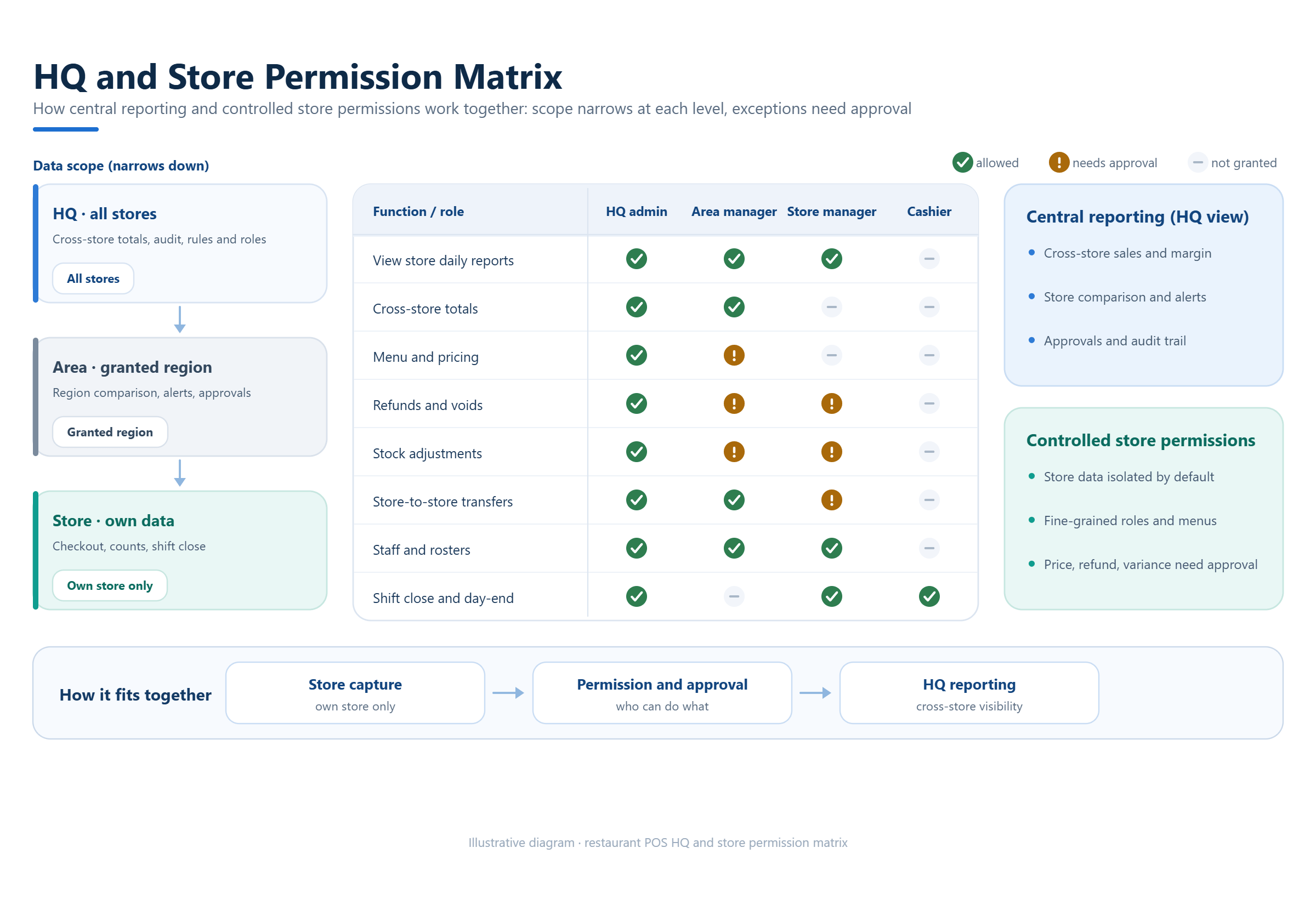
A group needs one view of performance, but it should not give every user unlimited access. Ask for a permission matrix covering headquarters, regional managers, store managers, cashiers, kitchen staff and external implementation partners. Each role should have a defined scope for viewing sales, changing menus, issuing refunds, exporting data and managing users.
Review the reporting dimensions before looking at chart designs. Can the group compare locations by sales, discounts, refunds, payment type, item, channel, hour and day? Can it separate a location’s data when required for accounting or local management? Can managers see current operational information from a mobile device, and can the business export the underlying records for analysis?
Check how the system handles a shared customer or loyalty record, if that is part of the plan. Decide whether membership, stored value, points and promotions are group-wide or location-specific. The policy needs to be agreed before configuration because a technically possible feature may still create accounting, privacy or customer-service questions.
8Treat deployment and local integration as a project
A multi-location rollout involves data, devices, training, support and change management. Confirm whether the system is provider-hosted, deployed in a private environment, or installed on infrastructure controlled by the customer. Ask who owns the data, who performs backups and restores, how upgrades are scheduled, and how the group can export data if the relationship ends.
Local payment, tax, fiscal-device or e-invoice work should have its own discovery step. The target country, provider, interface specification, certification environment and test responsibility all affect the scope. Put the result in a statement of work that distinguishes standard configuration, third-party dependency, paid customization and items still awaiting confirmation.
Also define the support boundary. Identify who handles the first response, store opening support, device replacement, payment-provider coordination, software updates and incident communication. Public pages may describe broad support programs, but the project should rely on the service agreement and responsibility matrix that both parties approve.
9Build a shortlist using evidence, not slogans
A practical shortlist can be built with a simple scorecard. Give each vendor a score for restaurant workflow fit, multi-location controls, menu governance, inventory depth, local payment readiness, reporting, deployment, support and total implementation effort. Give more weight to the problems that would disrupt daily operations.
Use the same script for every vendor. Ask for a live demonstration, written feature scope, hardware assumptions, integration prerequisites, data ownership terms and a rollout plan. Record whether each answer is standard, configurable, custom, contract-dependent or unknown. This keeps the evaluation useful for both an operator and a POS reseller comparing solutions for several clients.
A competitor’s public feature page is a useful research input, not a substitute for proof. Toast, Square, Lightspeed and Odoo all publish material about restaurant workflows or multi-location operations, but their editions, geography, integrations and commercial terms differ. Compare the evidence that applies to your locations and request a pilot when a requirement is critical.
10Run a pilot before you roll out every location
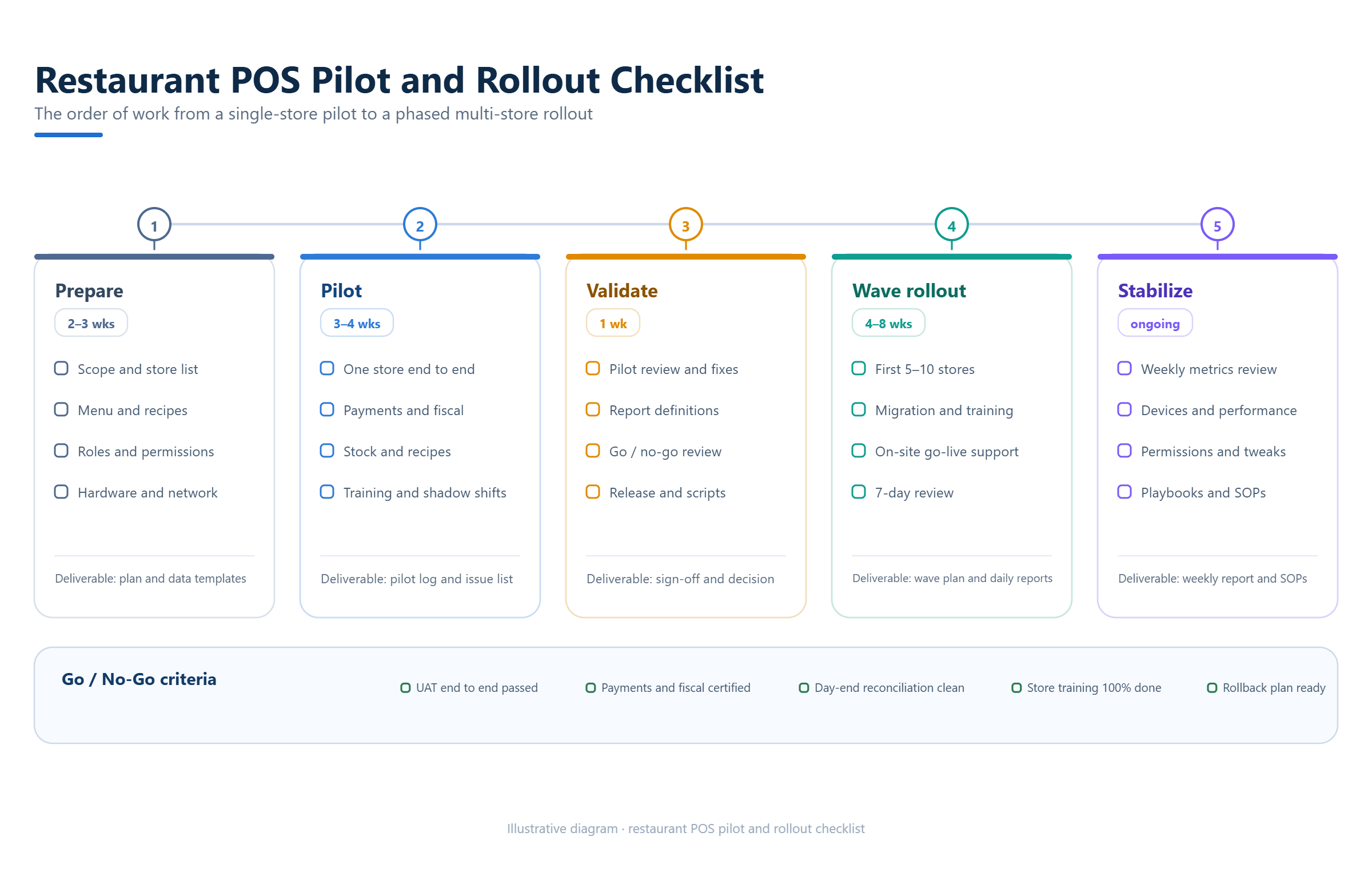
Choose one representative location for the pilot. It should include the busiest order path, the most complex modifiers, the relevant payment methods, the key kitchen stations and at least one manager who will use the reports. Load real or carefully anonymized sample data and measure the tasks that matter to the team.
The pilot should include opening procedures, a peak-period order, a correction, a refund, a stock adjustment, an end-of-day close, a report export and a simulated connectivity interruption. Capture the time, error rate, training questions and unresolved dependencies. A pilot is successful when the business can explain how the system will operate on a difficult day, not simply when a demo transaction succeeds.
Use the results to refine the rollout sequence. Some groups need a shared menu and reporting foundation first; others should start with one concept or one region. Keep local exceptions visible so they do not become hidden custom work during expansion.
11Where KunnPOS may fit
KunnPOS product materials describe restaurant workflows that include table and area management, multiple ordering touchpoints, kitchen printing or display processes, modifiers, split settlement, mobile management, inventory and chain-level reporting. The materials also describe beverage scenarios such as sweetness, ice and add-on settings, cup labels and pickup flows. These are relevant starting points for a restaurant group that needs one evaluation across food and beverage operations.
The same materials describe multi-language, time-zone, currency and tax settings, while the cooperation documents place local payment, fiscal and electronic-invoice connections in project evaluation. KunnPOS also discusses private deployment, branding, customization, reseller and software-service partnerships, and optional source-code delivery as items that must be defined by the project and contract. They should be treated as scope questions rather than automatic entitlements.
The correct next step is a requirement workshop using the scorecard in this guide. Confirm the target industry, number of locations, devices, payment providers, tax requirements, data arrangement, rollout plan and support responsibilities. KunnPOS can then be evaluated against the same evidence standard as every other vendor, with confirmed capabilities separated from configuration, paid development and items still awaiting verification.
12Frequently Asked Questions
13What is the most important feature in a multi-location restaurant POS system?
The most important capability is controlled consistency: the group should be able to standardize the processes that must match while allowing each location to manage genuine local differences. Menu governance, permissions, reporting and order routing should be tested together.
14How many locations do I need before a multi-location POS makes sense?
There is no universal number. Even two locations can benefit when they share menus, staff, inventory or reporting. The decision should be based on operational complexity and the cost of managing separate systems, not only on store count.
15Should every location use exactly the same menu and settings?
Usually no. A group may need a common menu structure and reporting model with local prices, hours, taxes, availability or prep stations. The system should make those exceptions visible and controlled.
16Can a POS provider guarantee local payment or tax compliance?
Only after the target market, payment provider, fiscal device or tax interface and certification responsibilities have been assessed. Ask for the exact integration scope and acceptance test in writing.
17What should be in a POS pilot acceptance checklist?
Include the core order paths, modifiers, kitchen routing, refunds, split payments, inventory adjustments, reports, permissions, device behavior, offline recovery, training and data export. Record the result for each location-specific requirement.
18Conclusion
Selecting a multi-location restaurant POS system is an operating decision. The strongest choice is the platform that matches the group’s real order, kitchen, inventory, reporting and local-compliance workflows, with clear responsibility for deployment and support. Use a common test script, insist on written scope and pilot the difficult cases before committing every location.
If you are comparing restaurant, beverage or multi-location POS options, KunnPOS can review the operating model, devices, local integration needs and deployment preference as a project. Contact the KunnPOS team to define the requirement list and confirm which items are standard, configurable, custom, contract-dependent or still under evaluation.