
1Introduction
POS software customization usually begins with a practical problem: a workflow does not fit the standard product, a local rule needs a different treatment, or an existing business system must exchange information with the POS. The difficult part is deciding what should be configured, connected, developed or left outside the project.
A useful customization brief starts with the business event rather than a feature wish list. It explains who performs the task, what triggers it, which data and rules are involved, what exception cases matter and how the result will be accepted. This helps a merchant, software provider, reseller or implementation partner discuss a realistic scope.
This article presents a requirements framework for POS customization projects. It uses public market materials as comparison points, while keeping KunnPOS statements within the available product and cooperation documentation. A possible customization direction is not an automatic product promise; feasibility, effort, ownership and commercial terms still require project confirmation.
2Start with the workflow that needs to change
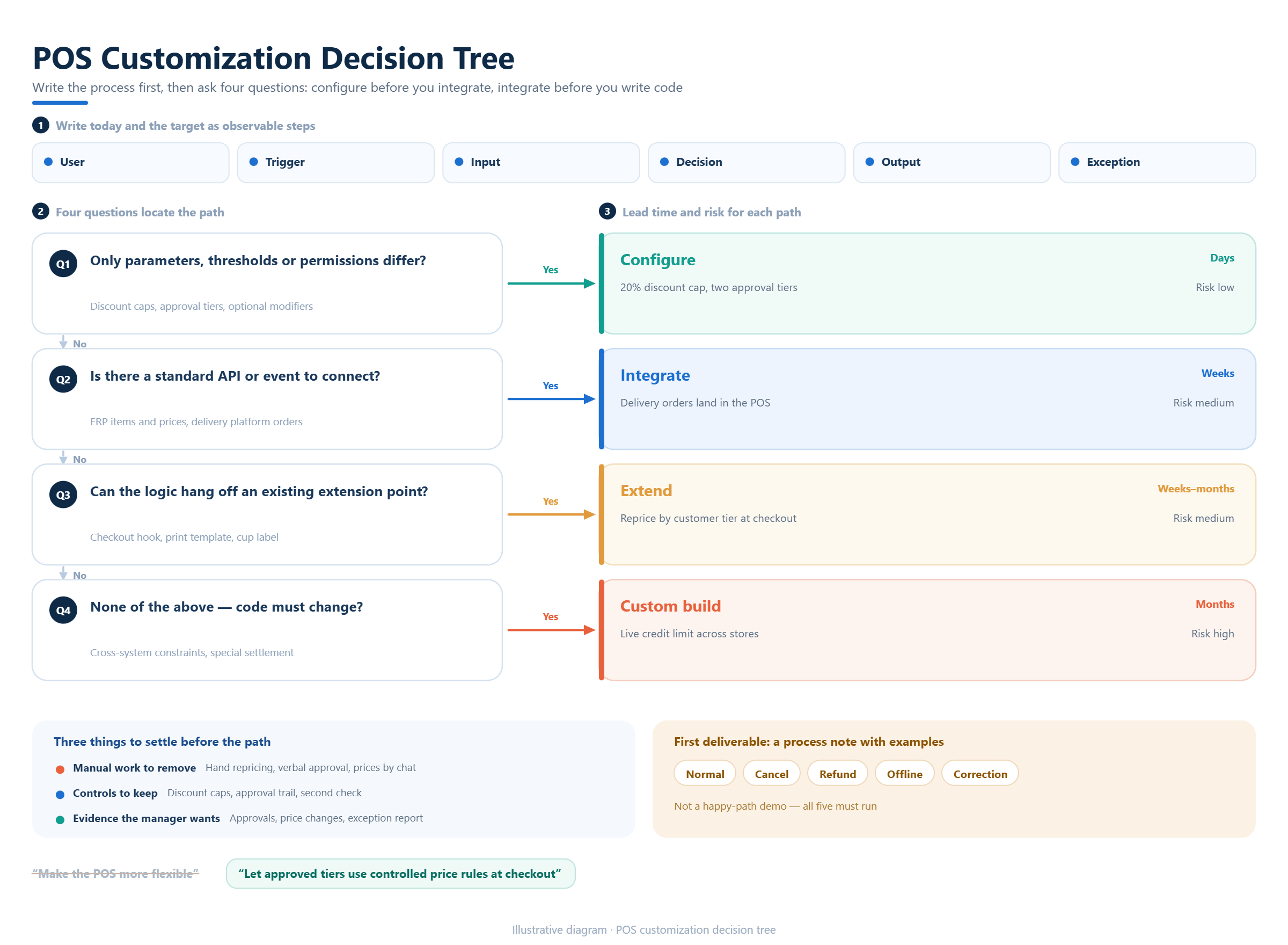
Describe the current workflow in observable steps. A store may need a special approval before a discount, a restaurant may need a different order handoff, or a distributor may need customer-specific prices and credit rules. Record the user, trigger, inputs, decisions, outputs and exception cases before discussing screens or code.
Write the desired workflow beside the current one. Identify the manual work that should disappear, the control that must remain and the evidence a manager needs after completion. A request such as “make the POS more flexible” is too broad; “allow an approved customer tier to receive a controlled price rule at checkout” can be evaluated.
The first deliverable should be a workflow brief with examples. Include normal transactions, cancellations, refunds, offline situations and corrections. This prevents a customization project from being designed around a successful demonstration while the difficult operational cases remain undefined.
3Separate configuration, integration and custom development
Most POS projects contain three different types of change. Configuration adjusts supported settings such as taxes, roles, products, prices or reports. Integration moves data between systems or devices. Custom development changes behavior, adds a workflow or creates an interface that is not available through existing settings or documented connections.
Ask the provider to classify every requested item. A configurable item should have a documented setting and a test case. An integration item should identify endpoints, entities, timing, authentication and error handling. A custom item should identify the new behavior, affected modules, dependencies, acceptance evidence and ongoing maintenance responsibility.
This classification protects both sides. It avoids paying for development when a supported setting is enough, and it avoids treating a genuinely new requirement as if it will appear through a checkbox. KunnPOS cooperation materials describe configuration, API, integration and customization as matters that must be evaluated by project and contract.
4Define users, permissions and approval rules
Customization often changes who may do what. List cashier, supervisor, store manager, finance user, warehouse user, administrator and partner roles that touch the workflow. For each role, define the permitted action, the approval threshold, the information visible and the record created after the action.
Pay special attention to discounts, refunds, voids, price overrides, customer credit, inventory adjustments and data exports. A workflow that is convenient for a cashier may be unacceptable if it removes the manager approval or audit evidence required by the business. Permission rules should be tested with both allowed and rejected cases.
If a partner or reseller will configure the system for multiple customers, separate platform-level permissions from customer-level permissions. Brand, customer ownership, credential responsibility and support escalation should be written into the project boundary rather than assumed from the existence of an API or administrator account.
5Specify data, fields and business rules
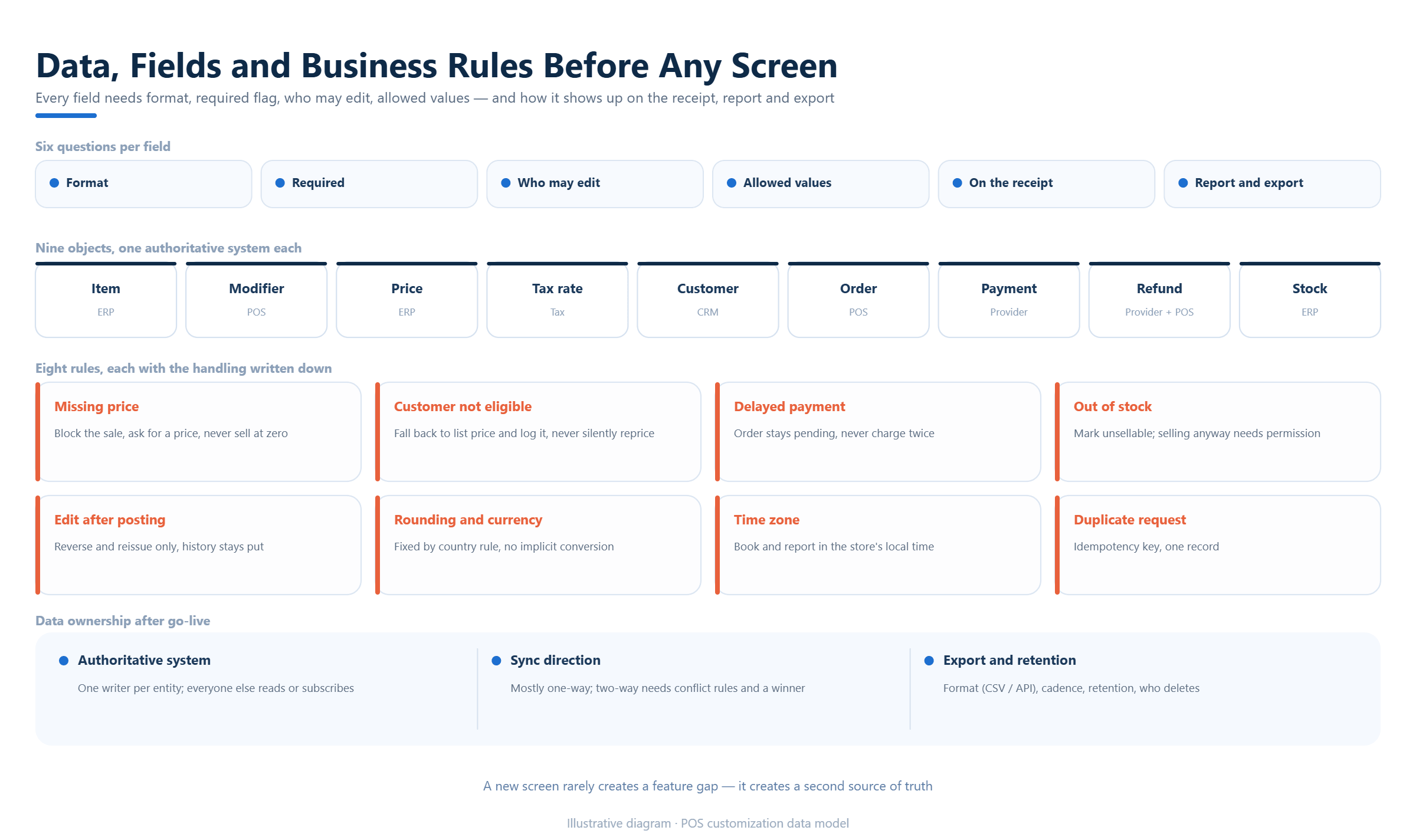
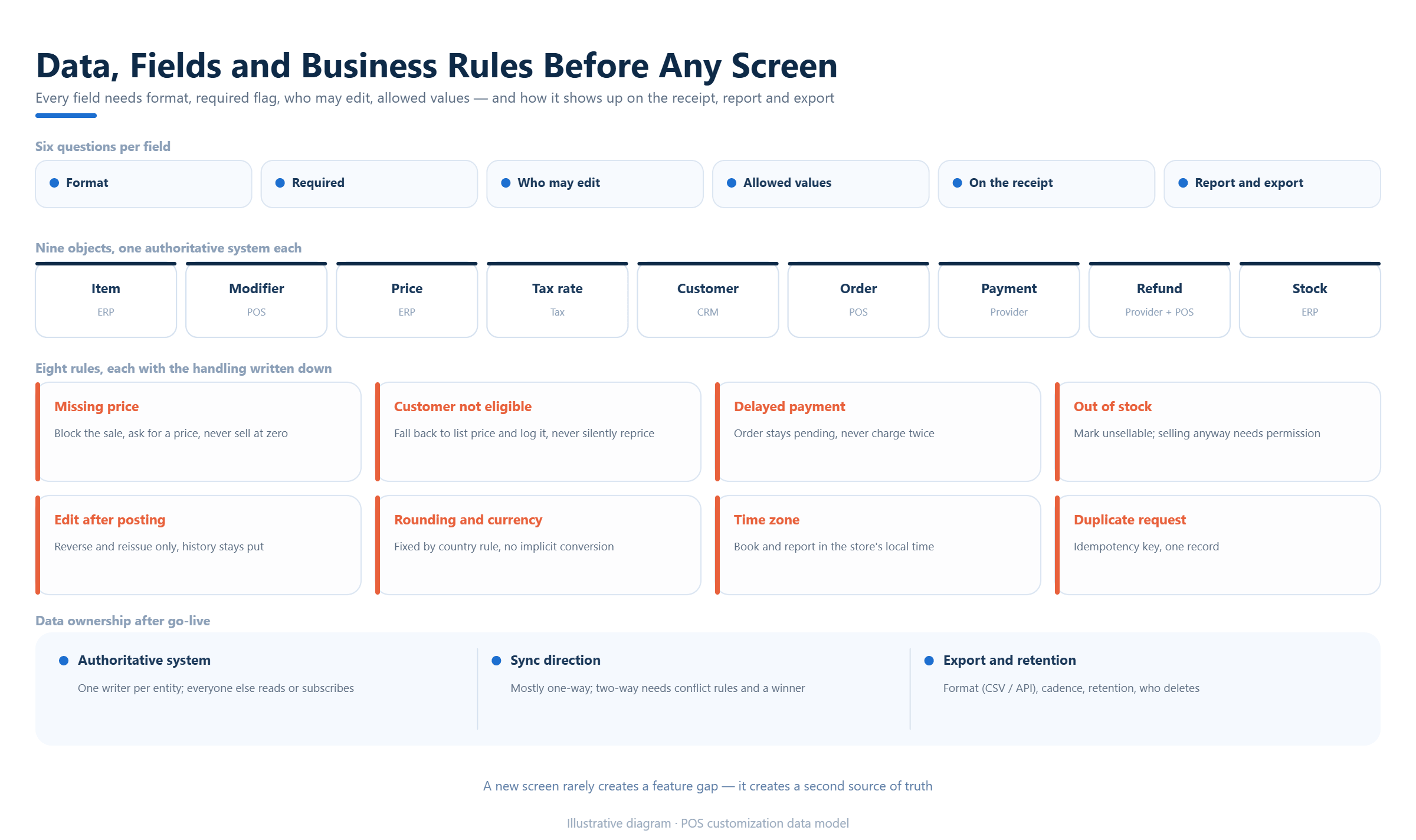
A custom workflow needs a clear data model. List each field, its format, whether it is required, who can change it, the allowed values and how it appears in receipts, reports or exports. Include products, modifiers, prices, taxes, customers, orders, payments, refunds, inventory and any industry-specific record relevant to the workflow.
Describe business rules with examples. State what happens when a price is missing, a customer is not eligible, a payment is delayed, an item is out of stock or an order is edited after posting. Rules should also cover rounding, time zones, currency, tax exceptions and duplicate requests when those conditions affect the result.
Data ownership matters after launch. Identify the authoritative system, the synchronization direction, the export format and the retention or deletion responsibility. These questions overlap with integration work, but they should be written in the customization brief so that a new screen does not create an unclear or duplicated source of truth.
6Include hardware, payment and local dependencies
A software change can fail because the surrounding device or service does not support the intended workflow. List terminals, printers, scanners, scales, cash drawers, kitchen devices, fiscal equipment and payment providers that must participate. Record operating system, connection method, supported actions, offline behavior and the party responsible for device testing.
Payment and tax changes need special care. Define authorization, capture, reversal, refund, settlement, receipt and reconciliation events, then identify which provider or fiscal service owns each response. A customization that displays a new payment button is incomplete if the order status, settlement record or exception handling is not defined.
KunnPOS materials describe local payment, tax and API connections as project evaluation directions. They do not make every provider, country or device an automatic standard capability. A proposal should therefore identify the target service, required documentation, test environment, expected effort and commercial approval before promising delivery.
7Choose the smallest viable customization path
Compare four paths:use existing configuration, use a documented integration, add a limited extension or commission a broader custom development project. The right choice depends on the business value, urgency, number of users, operational risk, future changes and the cost of maintaining a new behavior.
Start with the narrowest path that solves the verified problem. A report export may be safer than changing checkout logic. An API connector may be preferable to duplicating master data. A controlled approval step may be better than creating a new pricing engine. The brief should record alternatives considered and why the selected path fits.
Avoid using “customizable” as a substitute for a decision. Ask what is available now, what requires configuration, what requires development, what depends on a partner and what is excluded. This language gives procurement, implementation and support teams a common basis for estimating the project.
8Plan environments, testing and rollout
A customization should be tested in an environment that resembles the intended deployment. Define test data, user roles, connected services, devices, tax settings, currencies and language options. Keep test and production credentials separate and record who can approve a release.
Build a test matrix from the workflow brief. Include normal sales, discounts, refunds, cancellations, partial payments, offline recovery, duplicate events, permission failures, report totals and data exports. For every case, write the expected result, observed result, evidence and owner of any unresolved issue.
Rollout planning should cover training, pilot stores, rollback, support contacts and the change process after launch. A custom feature that works in a demonstration can still fail operationally if staff do not know the new steps or if support cannot identify whether an issue belongs to the POS, a partner or the customer’s own system.
9Define acceptance and change control
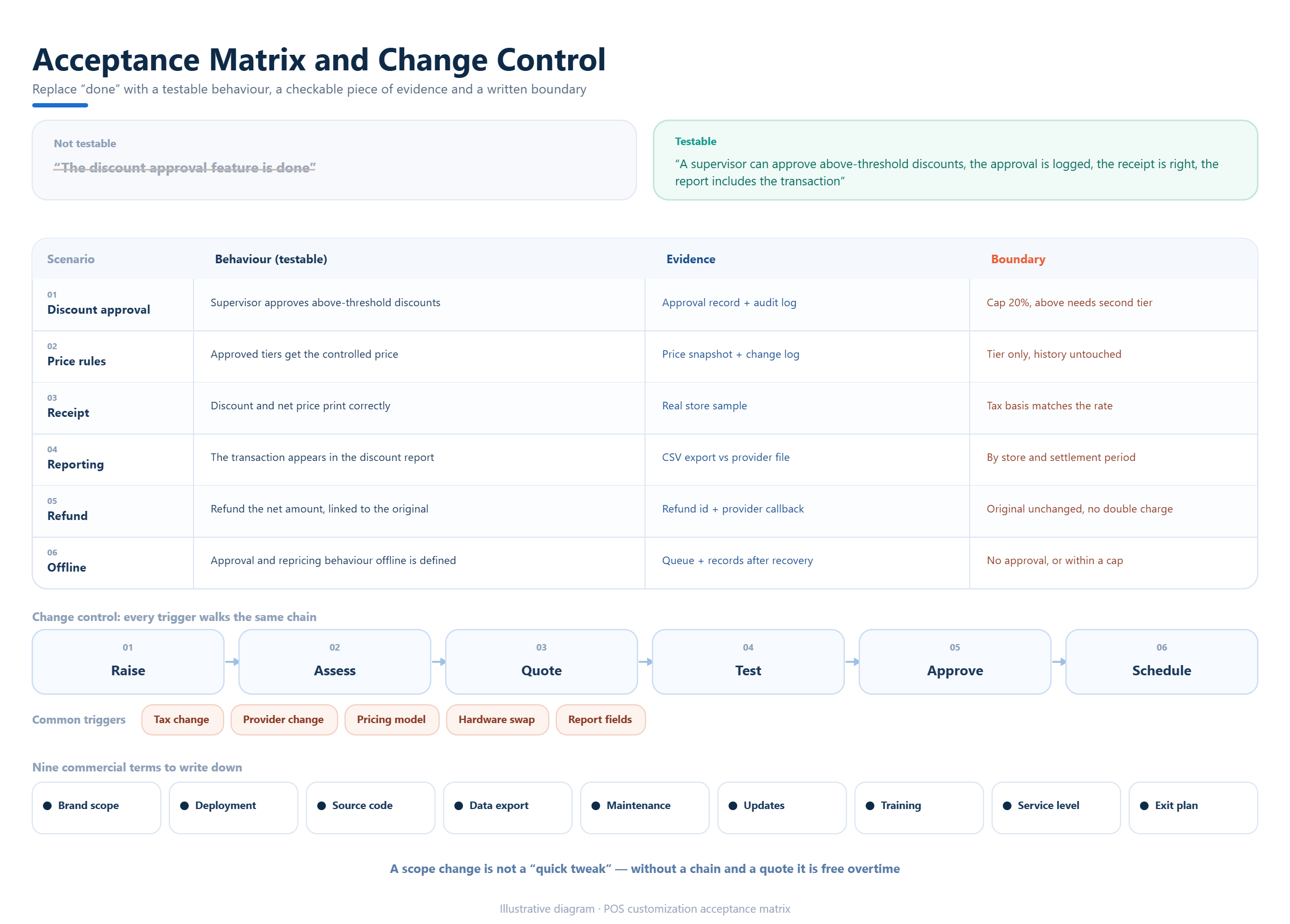
Acceptance criteria should describe behavior, evidence and boundaries. “The feature is complete” is weaker than “a supervisor can approve a discount above the threshold, the approval is recorded, the receipt is correct and the report includes the transaction.” Each criterion should be testable by the parties who sign off the project.
Record what happens when a requirement changes. A new tax rule, payment provider, price model, hardware device or report field may alter the original scope. Define how a change is requested, assessed, priced, tested, approved and scheduled. This avoids turning an agreed customization into an unlimited list of additions.
Commercial documents should also clarify ownership and support. Depending on the project, parties may need to confirm branding, deployment, source-code access, data export, maintenance, update responsibility, training, service levels and exit arrangements. KunnPOS cooperation materials require these conditions to be confirmed for the actual project and contract.
10Compare the evidence offered by POS providers
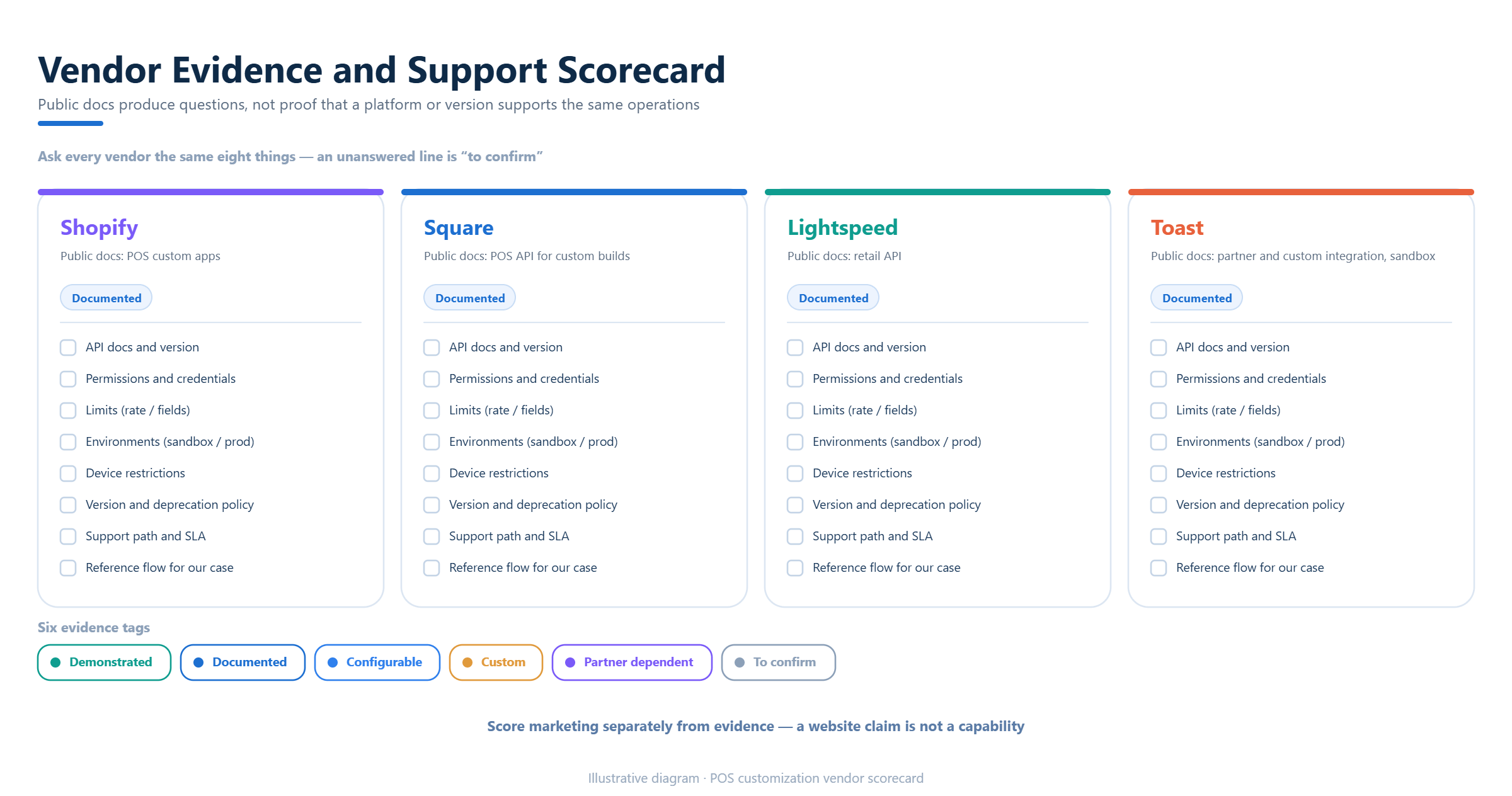
Public developer materials show that providers expose different levels of control. Shopify describes adding custom apps to its POS experience. Square documents a Point of Sale API for customized solutions and integrations. Lightspeed publishes retail APIs and explains that developers can build custom integrations. Toast provides partner and custom integration documentation with sandbox guidance.
These examples are useful for forming questions, not for assuming that every platform or KunnPOS version supports the same operation. Ask each provider for the relevant documentation, scopes, rate limits, environments, device restrictions, version policy, support path and example of the requested workflow.
Score evidence separately from marketing language. Mark each requirement as demonstrated, documented, configurable, custom, partner-dependent or unconfirmed. A provider with fewer claims but clearer boundaries may be easier to implement and support than one that simply says everything is customizable.
11Where KunnPOS may fit a customization project
KunnPOS materials cover restaurant, beverage, retail, wholesale and fresh-food POS contexts, together with API, integration, plugin-style customization, local payment or tax connection and cooperation models. A suitable project begins by mapping the customer’s actual workflow and separating standard operations from the requested change.
A requirements workshop can map users, roles, products, prices, taxes, payments, inventory, reports, devices, deployment, data ownership and support. The output should identify what belongs to the selected version, what is configurable, what may require paid development, what depends on a local provider and what still needs technical or contractual confirmation.
For a merchant, software provider, distributor or partner, the next step is a reviewable brief rather than a broad promise. KunnPOS can assess the requested scenario against available materials and project conditions. Final scope, effort, pricing, ownership and delivery obligations must remain subject to the relevant agreement.
12Frequently Asked Questions
13What are POS software customization requirements?
They are the workflow, user, data, rule, hardware, integration, testing, support and commercial conditions needed to change a POS for a defined business need.
14How do configuration and custom development differ?
Configuration uses supported settings. Custom development changes behavior or creates a capability that is not available through existing settings or documented connections.
15What should a POS customization brief include?
It should include users, triggers, steps, fields, rules, exceptions, devices, integrations, acceptance evidence, support ownership and change boundaries.
16Can every POS customization request be delivered through an API?
No. An API may expose data or actions, but the requested workflow may still require configuration, extension, partner support or a separately scoped development project.
17Can KunnPOS evaluate a custom POS project?
KunnPOS materials describe relevant customization and integration directions. Actual feasibility depends on the selected product, systems, hardware, local providers, scope and contract.
18Conclusion
A successful POS customization project turns a business problem into a testable operating change. Start with the workflow, classify the path, define users and data, include hardware and local dependencies, test realistic exceptions and agree acceptance, support and commercial boundaries.
If you are preparing a POS customization request, KunnPOS can use a requirements workshop to separate standard, configurable, custom, partner-dependent and unconfirmed items. This creates a clearer basis for technical review and a more responsible project discussion.