
1Introduction
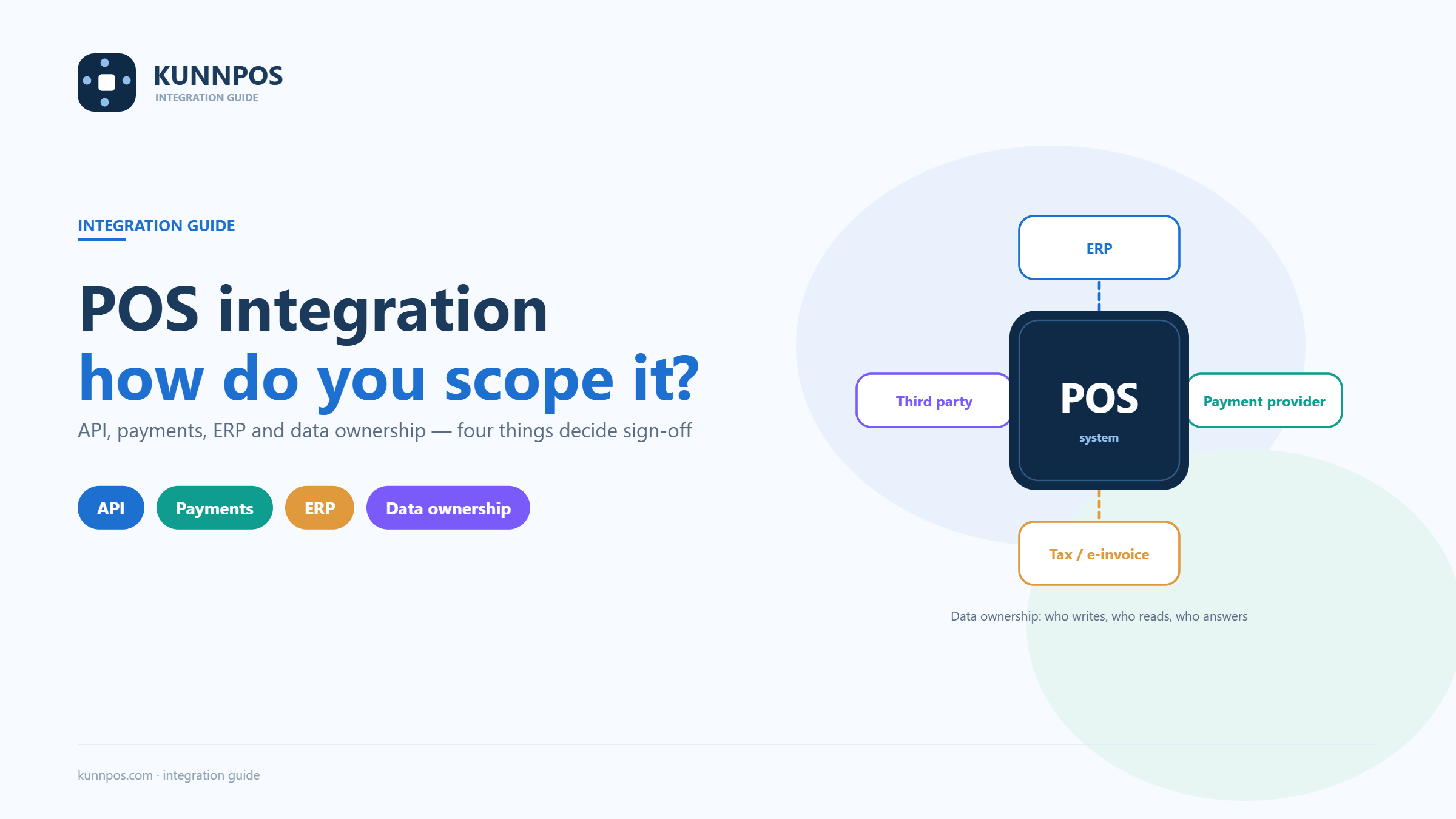
A POS integration project connects the transaction system to the tools that run the rest of the business. That may include a payment provider, accounting platform, ERP, delivery channel, loyalty service, e-commerce site, warehouse or data warehouse. The connection can remove manual work, but only when the business agrees on data, ownership, security and acceptance before development begins.
“We need an API” is therefore only a starting point. A useful evaluation asks what must move, when it must move, which system is authoritative, what happens when a request fails and who supports the connection after launch. This guide gives operators, software providers and POS partners a framework for scoping those decisions. It also explains how KunnPOS materials should be discussed: as a direction for project evaluation, configuration and possible custom development, with exact scope confirmed in the proposal and contract.
2Define the business outcome before the interface
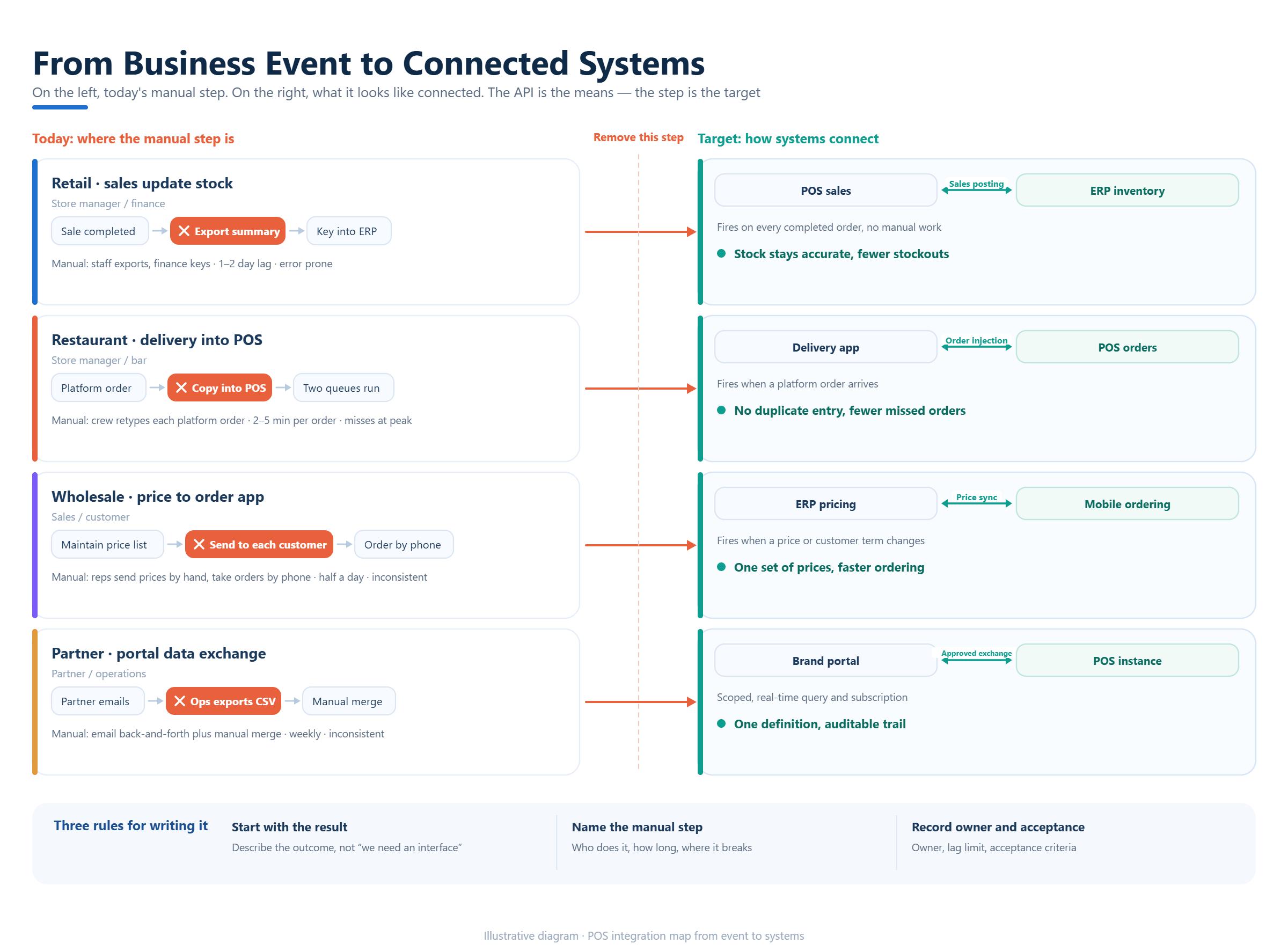
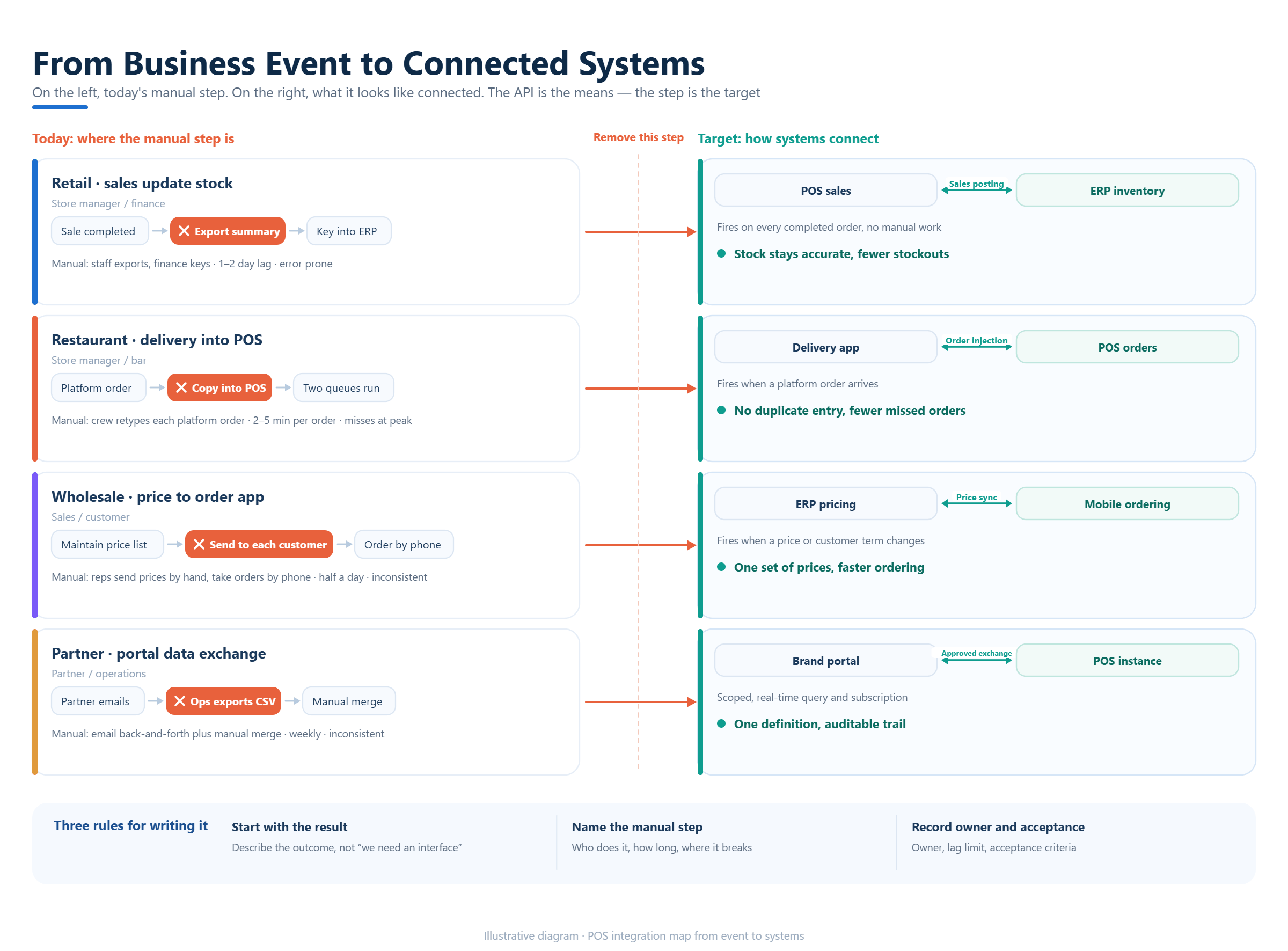
Begin with the business event that needs to improve. A retailer may want sales to update ERP inventory. A restaurant may want delivery orders to reach the POS without re-entry. A distributor may need prices and customer terms to flow into a mobile order tool. A partner may need a branded portal to exchange approved data with a POS instance.
Write the current process and the desired process in plain language. Identify the manual step, the person who performs it, the delay or error it creates and the measurable result the project should achieve. This prevents a technical interface from becoming the goal by itself.
3Map systems, data owners and the source of truth
List every system that creates, changes or consumes a record. Common entities include products, modifiers, prices, tax rules, customers, orders, payments, refunds, inventory movements, suppliers and employees. For each entity, assign an owner. The owner is the system or team allowed to approve the value, not simply the place where a copy happens to be stored.
A product master may belong in an ERP while the POS owns the sellable menu and modifier display. A payment provider may own the authorization result while the POS owns the order status. When two systems can edit the same field, define conflict rules and an audit trail before writing code.
Data ownership also affects exit planning. Confirm how the business will export transactions, integration logs and configuration if a partner, payment service or software contract changes. These questions are part of a responsible custom POS project.
4Choose the integration pattern for the risk
An integration may use a REST API, webhooks, scheduled files, a middleware service, direct database exchange or a partner connector. The right pattern depends on latency, volume, security, retry behavior and the capabilities of the systems involved. Real-time is not automatically better if the business only needs an hourly reconciliation.
Ask whether the interface supports the operations you need: create, update, read, cancel, refund, resend and reconcile. Review authentication, rate limits, versioning, pagination, idempotency and error codes. If a provider exposes only selected endpoints, the project should document the missing operations instead of assuming they can be added later.
Middleware can be useful when several systems need the same transformation, monitoring and retry policy. It also creates another operational dependency. Define who owns its credentials, hosting, alerts and upgrades.
5Treat payments as a separate workstream
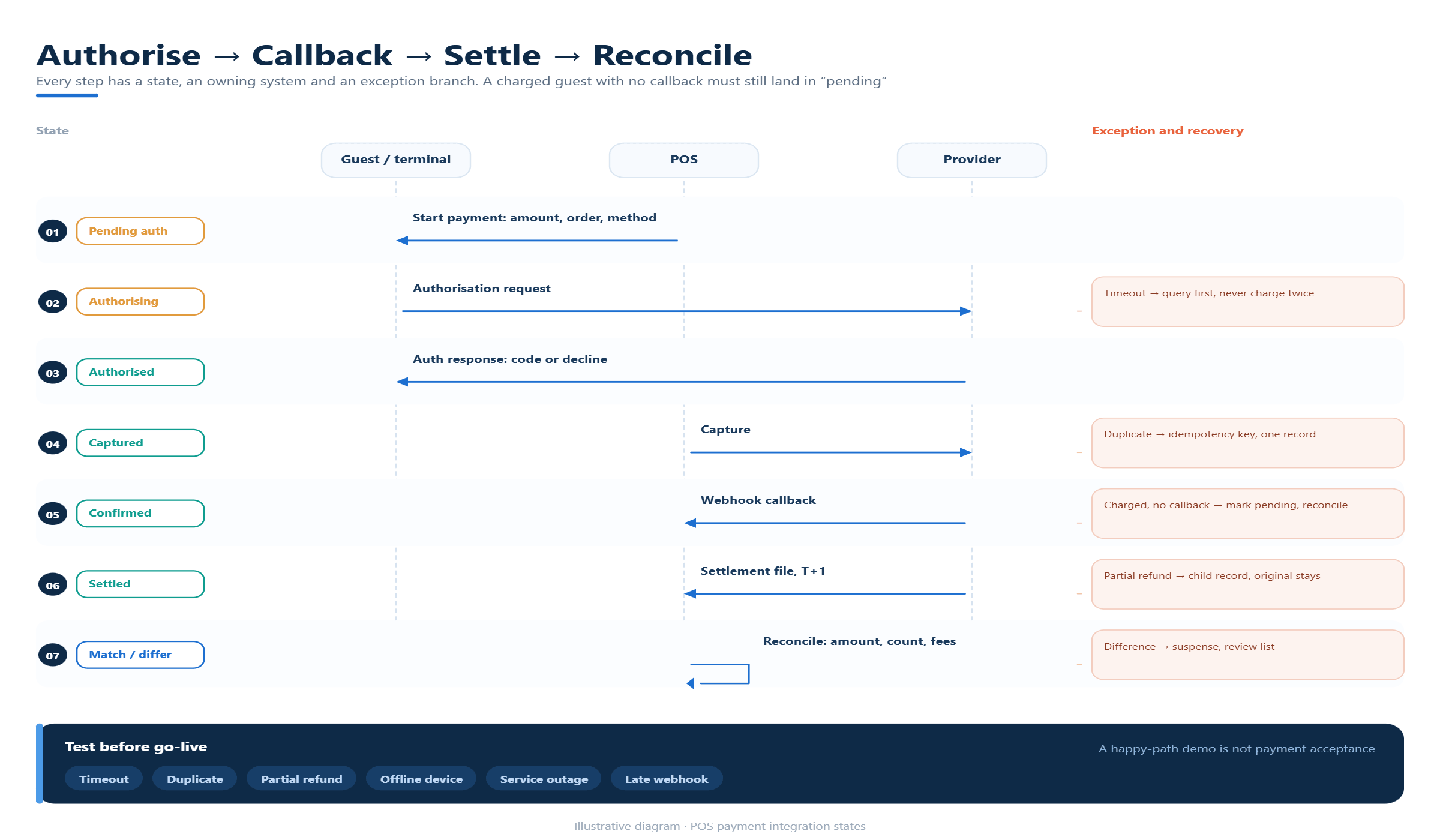
Payment integration is more than sending an amount to a terminal. Scope the authorization, capture, reversal, refund, tip, split payment, settlement and reconciliation events. Confirm which system receives the provider response and how an order is marked when the customer is charged but the POS does not receive the callback.
Local payment, fiscal or tax requirements may involve a service provider, certification environment, hardware and legal responsibility. KunnPOS source materials describe local payment and tax connections as items for project evaluation. The country, provider, interface specification, testing environment and commercial responsibility should be written into the project scope.
Run failure scenarios before launch: timeout, duplicate request, partial refund, offline device, provider outage and a delayed webhook. A successful happy-path demo is not payment acceptance.
6Plan ERP and accounting data carefully
ERP and accounting integrations usually need more than a daily sales total. Decide whether the receiving system needs item lines, tax components, discounts, tender types, refunds, fees, cost, inventory movements, supplier documents or customer balances. Map each field to a definition and an owner.
Choose the posting frequency and reconciliation method. A near-real-time feed may help inventory, while accounting may prefer a controlled daily posting. Define how late orders, corrections and closed periods are handled. The integration should not silently overwrite an approved financial record.
Use a sample period to compare POS totals, payment settlement and ERP postings. Include zero-value lines, discounts, returns and tax exceptions where relevant. Reconciliation is an acceptance requirement, not an afterthought.
7Protect data, credentials and operational access
Integration design should identify personal data, payment-related data, business-sensitive prices and credentials. Limit each service account to the permissions it needs. Separate test and production credentials, rotate secrets and record who can approve a change.
Ask where logs are stored, how long they remain available and whether they contain customer or payment details. A useful log records a correlation ID, event type, result, retry count and safe diagnostic detail. It should help support staff investigate without exposing unnecessary information.
For private or customer-owned deployments, confirm backup, monitoring, update responsibility and recovery procedures. “The API is available” does not define who keeps the integration operating.
8Define custom development and change control
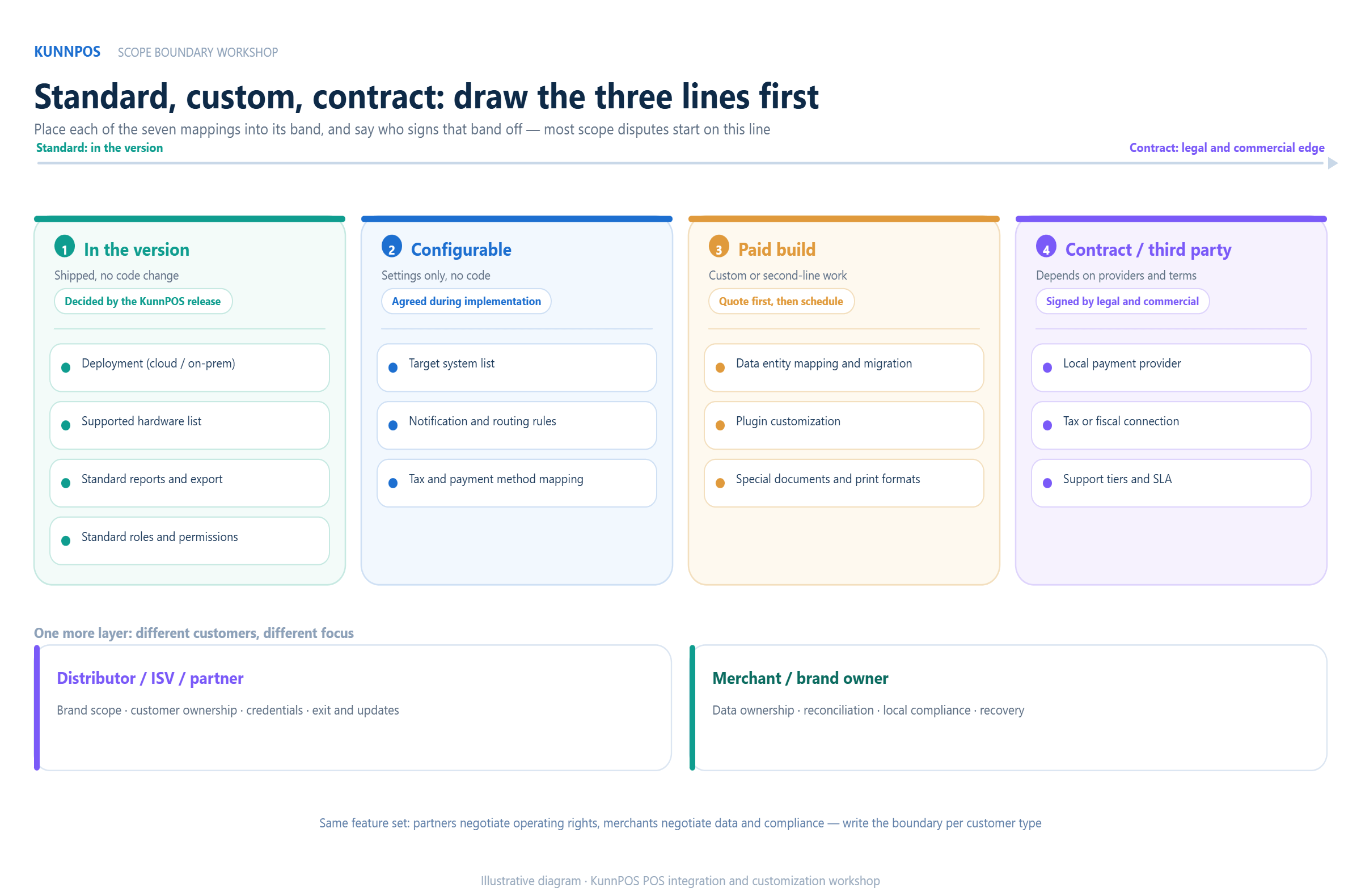
Separate standard configuration, partner integration, paid custom development and unconfirmed requirements. Write a short interface specification covering data fields, events, mappings, validation, retry rules, environments, test cases and acceptance criteria. This protects both the customer and the implementation team.
Change control matters after launch. A new tax rule, price model, payment provider or ERP version can change the data contract. Define how changes are requested, estimated, tested, approved and communicated. Avoid promising a fixed timeline or source-code right unless the commercial agreement actually provides it.
KunnPOS materials describe API, integration and plugin-style customization directions, while the cooperation materials require branding, deployment, source-code, support and local integration terms to be confirmed by project and contract. Use that distinction in every proposal.
9Test with realistic scenarios and failure paths
Create a test matrix that covers each connected workflow. Include a new product, price update, completed order, cancellation, refund, payment timeout, duplicate event, unavailable item, inventory adjustment and a report or reconciliation output. Use realistic volumes and role permissions where possible.
Test idempotency:sending the same event twice should not create two sales or two refunds. Test ordering: a refund should not arrive before the original transaction is known. Test recovery: after an outage, the system should identify what was queued, what succeeded and what needs review.
The acceptance record should show the scenario, expected result, observed result, responsible party and unresolved risk. This is more useful than a statement that the API was connected.
10Compare vendors and integration partners with evidence
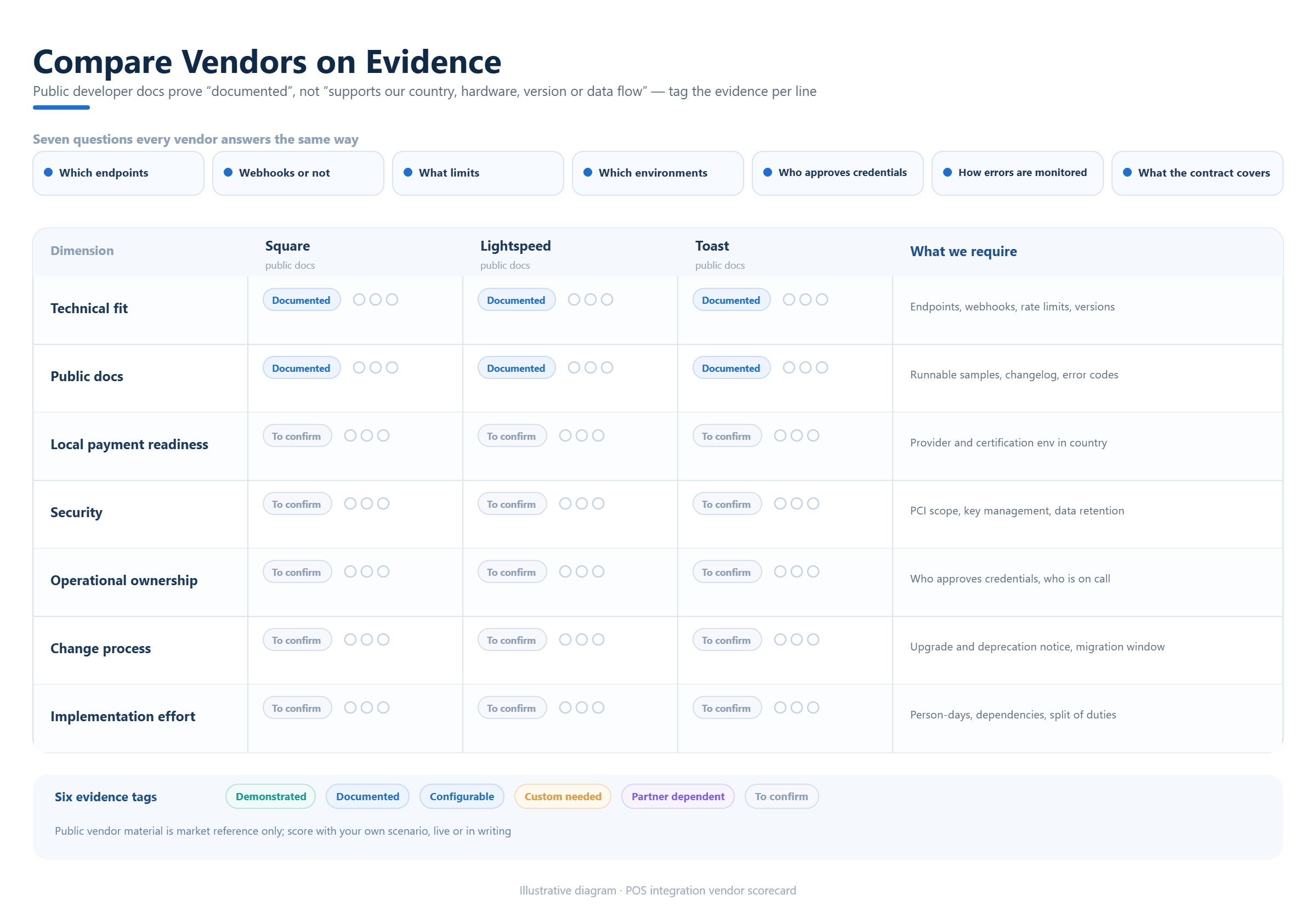
Official competitor developer materials show different integration models. Square documents a POS API that opens its POS application for in-person payment flows and lists platform requirements. Lightspeed describes APIs for third-party applications and custom add-ons. Toast publishes APIs for tender, devices, loyalty and partner integrations. These are useful market references, but they do not prove that any provider supports your country, hardware, plan or data flow.
Ask every provider to answer the same questions: Which endpoints are available? Are webhooks supported? What are the limits? Which environments exist? Who approves credentials? How are errors monitored? What does the contract cover? Request a live or documented demonstration using the project’s own scenarios.
Score technical fit, operational ownership, local payment readiness, security, documentation, change process and total implementation effort. Mark each answer demonstrated, documented, configurable, custom, partner-dependent or unconfirmed.
11Where KunnPOS may fit
KunnPOS materials describe APIs, interface integration, plugin-style customization and local payment or tax connection as possible project directions. They also describe standard restaurant, beverage, retail, wholesale and fresh-food POS scenarios. A business considering KunnPOS should therefore start with a requirements workshop that separates the standard operating workflow from the integration work around it.
Ask KunnPOS to map the target systems, data entities, payment or tax providers, deployment model, hardware, reporting needs and support responsibilities. Confirm which items are available in the selected version, which need configuration or paid development and which remain subject to technical or contractual confirmation.
For a reseller, software provider or partner, add branding scope, customer ownership, credential responsibility, support escalation, upgrades and exit arrangements. For a merchant, focus on data ownership, reconciliation, local compliance and recovery. The same platform can require different project boundaries for different buyers.
12Frequently Asked Questions
13What are POS system integration requirements?
They are the business, data, technical, security, payment, testing and support conditions needed to connect a POS with other systems. They include data ownership, interface operations, failure handling and acceptance criteria.
14Should a POS integration be real time?
Only when the business needs immediate updates. Choose timing based on inventory, payment, fulfillment, reporting and reconciliation risk. A scheduled exchange may be safer for some accounting workflows.
15Who owns data in a POS integration?
Ownership should be agreed by entity and process. One system may own the product master, another the payment authorization and another the financial posting. The project should document authority, edits, exports and audit history.
16What should a payment integration test include?
Test authorization, timeout, duplicate requests, callbacks, refunds, reversals, settlement and reconciliation. Include device or provider outages and confirm how the POS communicates the unresolved state.
17Can KunnPOS deliver a custom POS integration?
KunnPOS materials describe API, interface and customization directions. Actual feasibility depends on the selected version, systems, hardware, local providers, project scope and contract, so the required scenarios should be evaluated before any commitment.
18Conclusion
A successful POS integration is an operating agreement supported by software. Define the business outcome, map data ownership, choose an appropriate interface, isolate payment work, protect credentials, test failure paths and document support responsibility. These steps create a scope that can be evaluated and accepted.
If you are planning a POS API, ERP, payment or partner integration, KunnPOS can help structure a requirements workshop around the actual systems and deployment model. The next decision should identify what is standard, configurable, custom, partner-dependent or still awaiting verification.