
Why nobody publishes a price, and how to work out your own number in an afternoon
Search for what a retail POS system costs and you will find a dozen pages that list prices and are wrong within a year.
The reason is not that vendors are hiding. It is that the number depends on four variables that differ for every business — store count, terminal count, transaction volume and integration scope — and most published price lists quietly assume one store, one terminal and no integration. Read one of those lists, add your own store count, and you will land somewhere near the truth. Or you can build the number properly, which takes about an afternoon and gives you something a price list never can: a figure you can defend in a budget meeting.
This article gives you the calculation. It does not give you a price list, deliberately — see the note at the end on why.
The three components every retail POS quote is built from
Almost every retail POS quote, subscription or licence, decomposes into three parts. Ask the vendor to break their proposal into exactly these three and you will immediately see where the money is.
1. The software right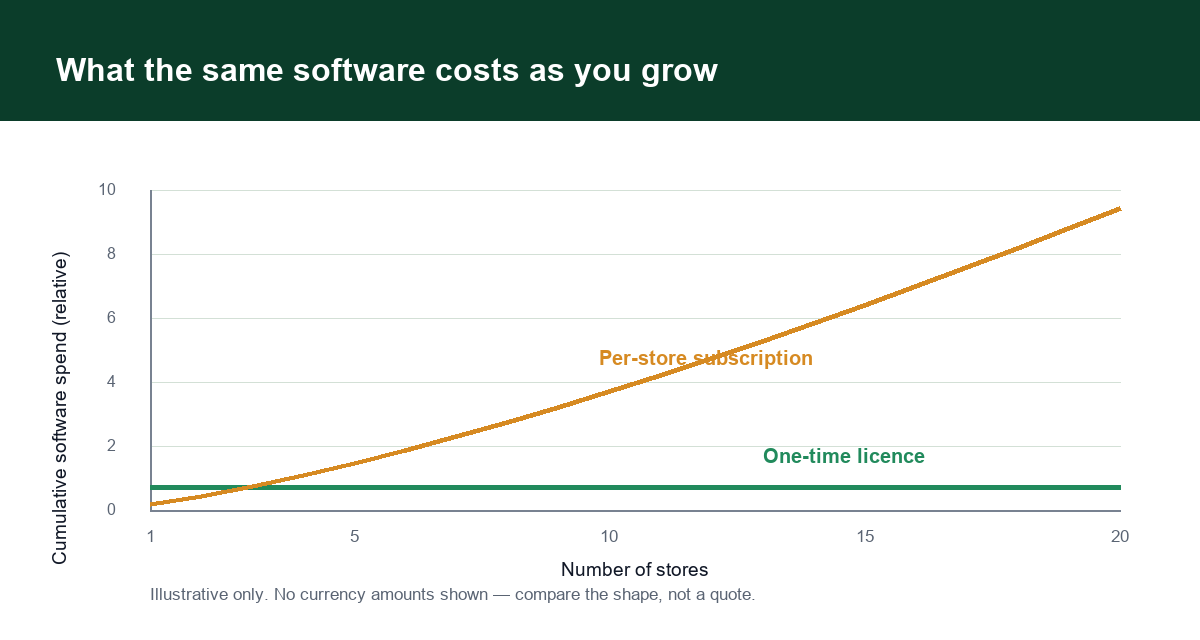 Subscription cost tracks your store count. A one-time licence does not. Illustrative only — no currency amounts.
How you pay for the right to use the system. Either a recurring subscription (monthly or annual, usually per store and sometimes per terminal) or a one-time licence. Everything downstream depends on which one this is.
2. The infrastructure
Where the software runs and what it runs on. In a hosted model this is bundled into the subscription and largely invisible. In a self-hosted or private-deployment model it is your server or cloud account plus the labour to run it.
3. The peripherals and integration
Terminals, scanners, printers, cash drawers, label printers, scales if you sell loose goods, plus the work of connecting your payment acquirer, your e-commerce platform and your tax reporting. This is the line that varies most between quotes.
Four lines that are not on the quote
These are the costs that decide whether the project comes in on budget. None of them is hidden maliciously; they are simply outside the software line item, so they are easy to overlook.
Payment processing. Usually the largest recurring number in the entire stack, and it is almost never included in the software price. It scales with revenue, not with store count. Compare the effective rate — total fees divided by total card volume — not the headline percentage, and check whether the POS ties you to one provider.
Data migration. Getting your product catalogue, supplier records, customer history and open balances out of the old system and into the new one. If nobody has quoted for this, somebody is about to do it manually.
Training and productivity dip. Staff move more slowly for two to six weeks after a switch. In a store with thin margins, that dip is a real cost, and it is the one most often left out of the business case.
Your own staff time. The implementation project has an internal owner. Somebody is going to spend days on data checks, configuration decisions and testing. That time has a cost even when it does not appear on an invoice.
The cost curve: how the total changes with store count
This is where subscription and one-time licence models separate, and it is arithmetic rather than opinion.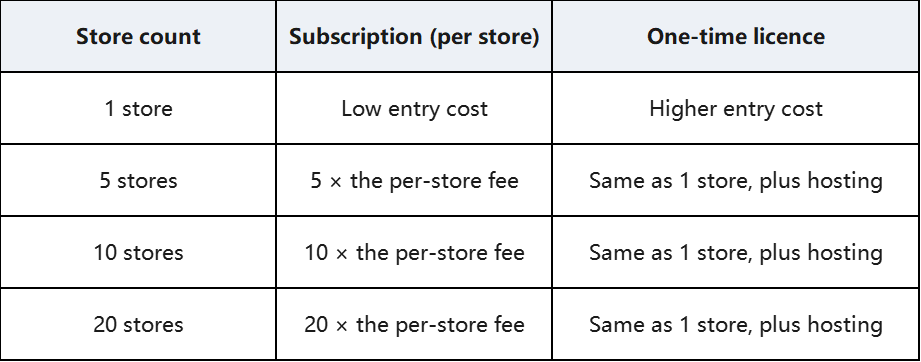
The subscription line grows with your success. The licence line is close to flat. That is the whole difference, and it means the answer to "which is cheaper" depends entirely on how many stores you plan to run.
At one or two stores, a subscription is usually the simpler and cheaper choice. At five and above, run the three-year arithmetic before you assume that is still true. If the symptoms are already showing up in daily operations, <a href="/blog/retail-pos-outgrown">seven warning signs you have outgrown your retail POS</a> are worth checking first.
Add the payment processing line to both columns before you compare. If the subscription provider requires their own processing at a higher effective rate, that difference can outweigh the software saving at almost any store count.
Common pricing structures, and what each one hides
Per store, per month. The most common subscription shape. Simple to compare, and it hides the terminal fee that appears when you need a second lane.
Per terminal, per month. Common in high-volume retail. The store fee looks reasonable and the terminal count is what actually drives the bill.
Bundled with processing. The software looks cheap because the margin has moved into the payment rate. Always ask for the effective rate on a statement, not a rate card.
One-time licence plus optional maintenance. The entry cost is higher and the recurring cost is optional. Check what the maintenance actually covers — version upgrades, security patches, support hours — before deciding to skip it.
Quoted, not published. Common in upper-mid market and enterprise. It is not automatically a bad sign, but it does mean you cannot compare until you have asked, and vendors know that.
How to build your own number
Work through these five steps and you will have a defensible three-year figure.
1.Fix your assumptions. Store count at three years, terminals per store, and average annual card volume. Write them down — every vendor will ask for different ones otherwise.
2.Request the software cost at your three-year store count, not today's. This one question changes most vendor conversations.
3.Ask for the effective payment rate you would actually pay, and apply it to your card volume.
4.Get separate quotes for integration and migration. If they will not separate them, ask for them itemised.
5.Add the internal time. Estimate days of your own staff time and price it at your own labour rate.
The result is not a precise prediction. It is a comparison you can actually make, which is more than a published price list will give you.
Five questions that make vendor quotes comparable
Ask every vendor the same five, in writing:
6.What is the cost at {your planned store count} stores and {n} terminals per store, for three years?
7.What is the effective payment processing rate, and can I use my own acquirer?
8.Which integration and migration work is included, and which is quoted separately?
9.What are the annual increases, and what are they tied to?
10.If we leave at the end of year two, what do we receive, in what format, and when?
Question five is the one that most changes the total. A system that costs slightly more and gives you your data back in a usable format is often the cheaper three-year decision, because exit cost is the one line nobody budgets for until it arrives. For how the major platforms differ on exactly that point, see the <a href="/blog/retail-pos-comparison">retail POS platform comparison</a>.
FAQ
How much does a retail POS system cost per month?
There is no single figure. The monthly cost depends on four variables: how many stores you run, how many terminals per store, your transaction volume, and how much integration you need. Subscription pricing is usually quoted per store, and often per terminal as well, with payment processing charged separately. The useful number is not the monthly fee — it is the three-year total across every store you plan to open.
Is a subscription or a one-time licence cheaper?
It depends on how many stores you plan to run. At one or two stores a subscription is usually the simpler and cheaper choice. From around five stores upward, a per-store subscription scales with your store count while a one-time licence does not, so the arithmetic starts to favour the licence. Add the effective payment processing rate to both options before comparing — that line often decides the answer on its own.
What is usually not included in a POS quote?
Four things most often sit outside the software line: payment processing fees, data migration from your current system, the productivity dip while staff learn the new system, and your own team's time on implementation. Ask for each of them to be quoted separately, in writing, so you can compare vendors on the same basis.
How do I compare POS quotes from different vendors?
Fix your assumptions first — three-year store count, terminals per store, annual card volume — then ask every vendor the same five questions: cost at your planned scale, the effective payment rate, which integration and migration work is included, the annual increase, and what you receive if you leave. Comparable answers matter more than a lower headline price.
Why does this article not list actual prices?
Because pricing in this category changes, varies by country and is frequently quoted rather than published. A specific figure written today is likely to be wrong within a year, and a wrong figure in a cost article undermines everything else on the page. The structure — three components, four unlisted lines, and a curve driven by store count — stays useful far longer.
A note on why this article has no prices
Pricing in this category changes, varies by country and is often quoted rather than published. Any specific figure written today is likely to be wrong within a year, and a wrong figure in a cost article destroys the reader's trust in everything else on the page.
What does not change is the structure: three components, four unlisted lines, and a curve that depends on store count. That is the part worth reading, and the part you can apply to your own numbers today.
*Written by the KunnPOS Team. KunnPOS builds privately deployable POS and store-management software for retail and food & beverage businesses, licensed once rather than per store. [See how it works](/solutions/supermarket) or [request a quote](/pricing).