
1Introduction
A restaurant POS system should fit the way a guest moves through the business. A quick-service restaurant needs fast order entry, clear production routing and a checkout flow that keeps a queue moving. A full-service restaurant needs table context, courses, seat assignments, changes during service and payment options that support hospitality.
Many buying decisions go wrong because “restaurant POS” is treated as one standard category. The same menu, device layout or kitchen workflow may work well for a counter-service café and create friction in a dining room. A strong evaluation starts with the service model, then checks whether the platform can support the real order, kitchen, payment and reporting path.
This guide explains how to compare a restaurant POS system for quick-service, full-service and hybrid operations. Public pages from Toast, Square, Lightspeed and Odoo show the feature areas that vendors commonly emphasize, but every capability still needs to be verified for the selected edition, market, hardware and project scope.
2Define the service model before comparing features
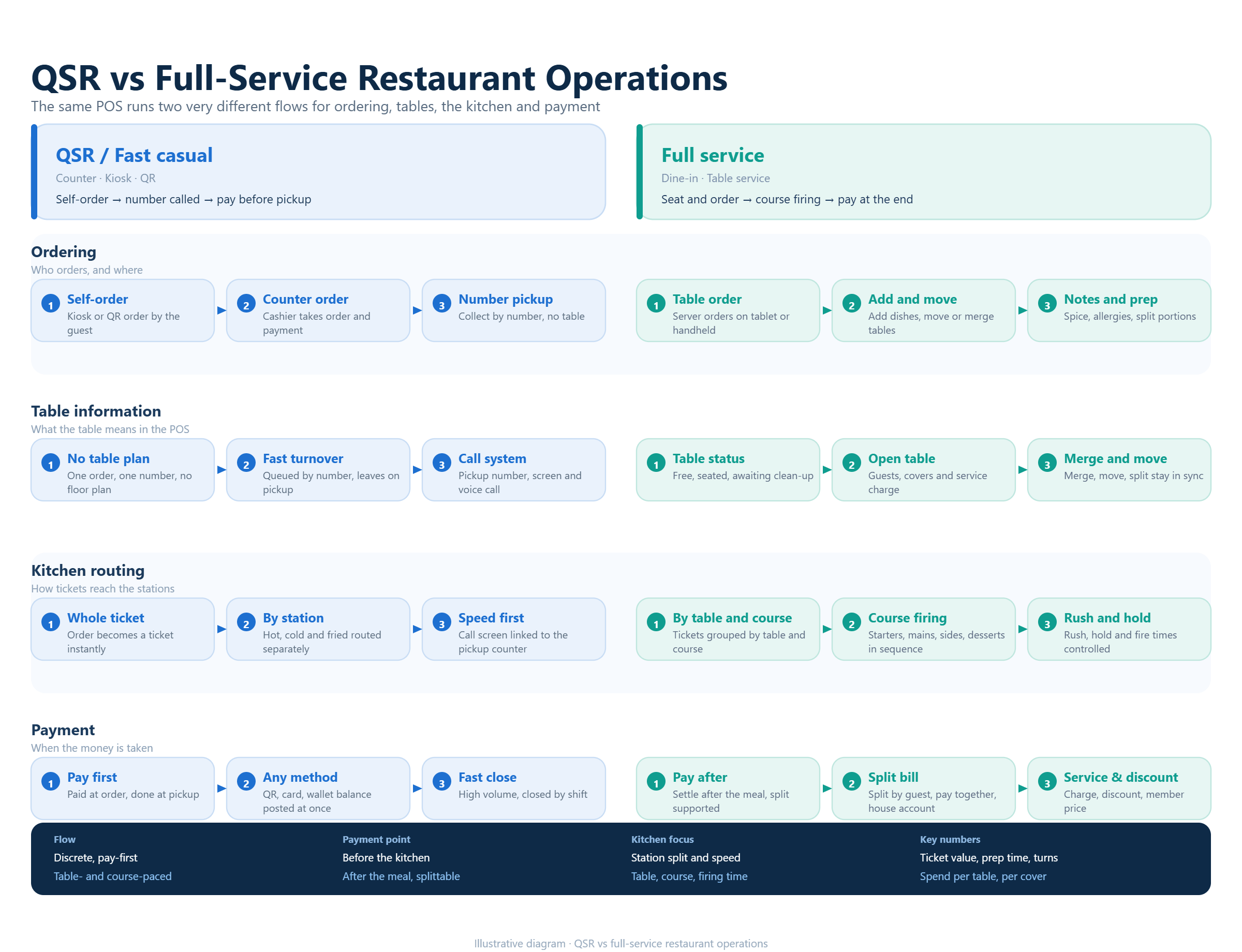
Write down how customers order, wait, receive food and pay. In quick service, the guest may order at a counter, kiosk, QR page or mobile channel, then collect the order from a pickup point. In full service, a host or server may seat the guest, take an order by table and seat, send courses at different times, transfer items and close a shared check.
Also record the moments that change during the day. A café may operate as quick service at breakfast and provide table service at lunch. A bakery may combine counter sales, pre-orders and catering. A bar may need tabs and timed promotions. The POS should represent these operating modes without forcing staff to create workarounds.
Use the service model as the first filter. Ask every vendor to demonstrate the same customer journey, including a correction, a sold-out item, a refund and a payment split. The purpose is to see how the system behaves under pressure, not to collect the longest list of modules.
3Evaluate quick-service speed at the busiest moment
For quick-service operations, the POS screen must help staff make accurate decisions quickly. Test the number of taps needed for a common order, the visibility of popular modifiers, the handling of combos and the process for changing an item after payment has started. A fast interface is useful only when it keeps the order readable for the kitchen and the guest.
Include every channel that matters to the concept. Test counter orders, self-ordering, QR ordering, online orders, delivery marketplace orders and phone or catering orders where relevant. Confirm whether each channel uses the same menu logic, modifier rules, taxes, availability and reporting categories. Separate channels can create duplicate work when they do not share a reliable source of truth.
The handoff after payment matters just as much as the order screen. Verify order numbers, customer names, pickup status, receipt details and the way staff handle a delayed or partially completed order. A queue moves smoothly when the POS, kitchen and collection area agree on the state of the order.
4Test full-service control from table to payment
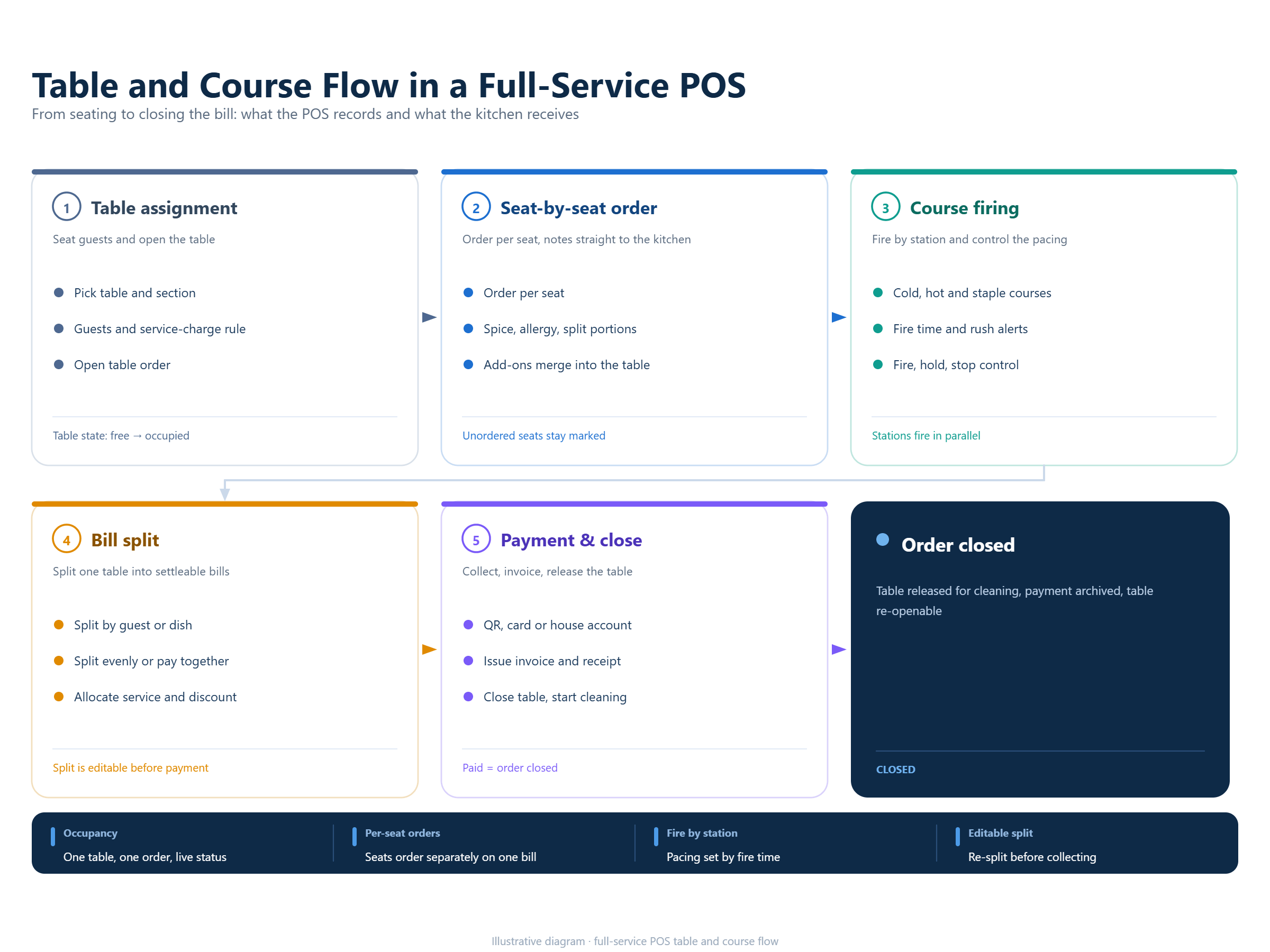
Full-service restaurants need the POS to remember context. During a demonstration, open a table, assign seats, enter a multi-course order, add a special request, fire one course, hold another and move an item to a different seat. Then split the check by seat and by item, apply a discount and close with more than one payment method.
Check table maps, sections, rooms, reservations and table status if they are part of the operating model. The visual layout should help a host or manager understand which tables are open, occupied, waiting for payment or ready to turn. It should also be possible to change the floor plan as the restaurant changes without losing historical sales data.
Ask how the system handles corrections. Servers should be able to void, re-fire or reassign an item with an auditable reason. Managers should have approval controls for discounts, refunds and cash actions. These controls protect the guest experience while giving the business a reliable record of what happened during service.
5Check whether a hybrid concept can change modes cleanly
A growing restaurant may not fit one label. Fast-casual brands often combine counter ordering with table numbers, pickup shelves, delivery and limited table service. A café may switch between morning counter service and afternoon table service. A food hall may have several concepts sharing a customer area but using different production stations.
Ask whether the POS supports separate modes, menus, order types or layouts without creating separate customer records and disconnected reports. Staff should know which screen to use for each situation, while managers should still be able to compare sales, labor and product mix in one reporting model.
Test a changeover rather than only a steady-state shift. For example, close a breakfast menu, open a lunch menu, pause one channel, mark an item unavailable and change the prep station rule. The platform should make the change visible and controlled, with a record that can be reviewed later.
6Build menus and modifiers that staff can understand
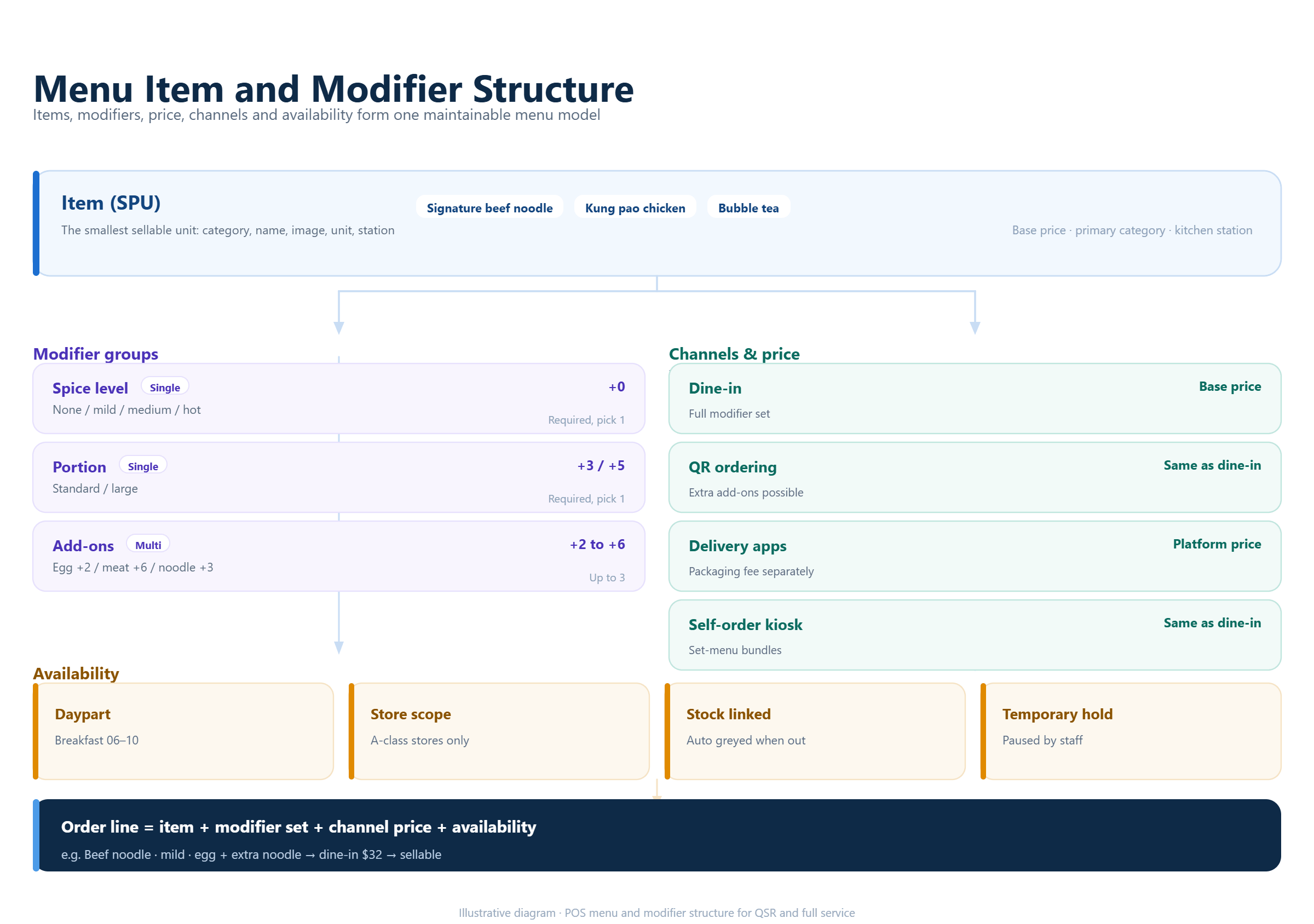
Restaurant menus become difficult when every item has too many choices. Design the menu around real decisions: size, temperature, cooking preference, add-ons, substitutions, allergens, course timing and special instructions. Then test whether staff can find those choices without reading a long training document.
For quick service, modifiers should support speed and consistent pricing. For full service, modifiers may need to preserve seat, course and kitchen context. For beverage operations, sweetness, ice, toppings, cup size and pickup labels may be central. A platform should let the business reuse a modifier structure while controlling where it appears.
Check the management side as well. Ask whether a price or modifier change can be scheduled, whether selected locations or channels can receive it, and whether an unavailable item can be paused without deleting its history. Menu governance affects every order, so the rules should be documented before launch.
7Follow the order into the kitchen and bar
A restaurant POS is also a communication system between front of house and back of house. Test printer routing or kitchen display routing for different categories, stations, courses and order types. Confirm how an order note, allergy warning, pickup time or table number appears to the team preparing it.
Use a realistic order with several stations. Send food to one kitchen, drinks to a bar, a dessert to a later course and a takeaway item to a packing area. Watch whether staff can acknowledge, hold, fire, remake and complete the correct line without losing the rest of the order.
Public competitor materials show this as a core category expectation. Toast describes orders moving from dine-in, takeout, delivery and online channels back to the kitchen. Square describes custom kitchen display routing for quick service and full service. Lightspeed documents kitchen display tickets and table or order context. These statements are useful comparison points; the live test must still match your hardware and workflow.
8Match payment and ordering options to guest behavior
Payment needs differ by service model. A counter restaurant may need fast card, wallet and cash acceptance with a simple receipt. A full-service team may need tableside payment, split checks, tips, bar tabs, deposits or pay-at-table QR flows. A hybrid concept may need more than one approach in the same shift.
Test online, QR and delivery orders as carefully as in-person payments. Confirm which system owns the order, how taxes and service charges are calculated, how refunds reach the customer and how staff handle an order that fails before reaching production. An integration can be technically available while still requiring project work, certification or a separate commercial agreement.
Ask for the exact offline behavior. Determine what can continue during a connection loss, which payments are stored locally, how the platform prevents duplicates and what happens when the device reconnects. Offline support is version- and payment-dependent, so it belongs in the acceptance test.
9Connect daily service with inventory, staff and reporting
The POS should turn service activity into useful operating data. Ask how a sale affects ingredient or product quantities, how recipes or bills of materials are maintained, and how waste, voids, discounts and refunds appear in reports. A restaurant may need different views for a store manager, kitchen lead, finance team and owner.
Check staff permissions and labor records. A cashier should not automatically have access to every report or refund function. A server may need to manage tables and orders but not change tax rates or delete products. Managers need enough visibility to act quickly while the business keeps a clear audit trail.
Reports should answer practical questions: Which items sell during each daypart? Which modifiers slow production? How long do orders wait at each station? Which discounts or refunds need review? Can the business compare channels, service modes and locations without exporting and rebuilding every report manually?
10Compare vendors with a service-model scorecard
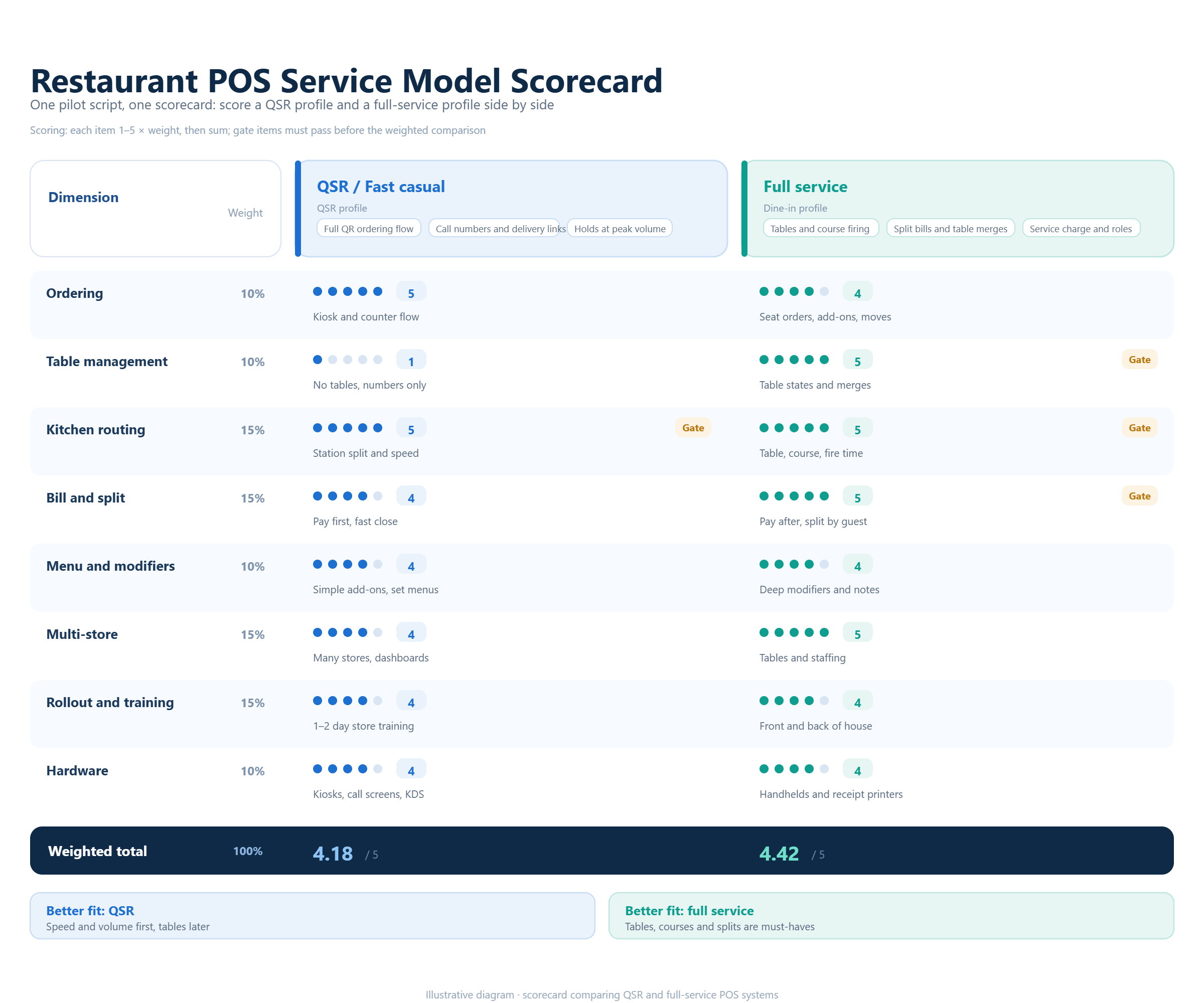
Create a scorecard with separate weights for quick-service and full-service requirements. Useful categories include order speed, table and seat control, menu and modifier depth, kitchen communication, payment options, offline behavior, inventory, staff permissions, reporting, hardware and implementation effort.
Public pages from Toast, Square, Lightspeed and Odoo illustrate different ways vendors describe restaurant POS capabilities. Toast groups its restaurant platform by concepts such as full service, quick service, fast casual and café. Square publishes separate quick-service and full-service workflows. Lightspeed lists tableside ordering, kitchen display, permissions, offline mode and multiple-location reporting. Odoo documents table, kitchen, course, split-bill and self-ordering features. Treat these pages as research inputs and confirm the version, market and commercial scope that apply to your project.
Run the same pilot for every shortlisted vendor. Use one quick-service order, one full-service table, one kitchen correction, one refund, one split payment, one item availability change and one end-of-day report. Record the number of steps, training questions, unresolved dependencies and the responsibility for fixing each issue.
11Where KunnPOS may fit
KunnPOS materials are most relevant here when the operating question is how to connect counter, table and beverage service in one project. For a quick-service team, the discussion should center on order types, modifier speed, pickup status and production routing. For a full-service team, it should center on table and seat context, course timing, split checks and manager controls. A hybrid venue should test whether these modes share menus, reports and data without forcing staff into workarounds.
The product sources describe restaurant and beverage workflows, but they do not turn every service-model requirement into a universal promise. Before launch, the customer should confirm the selected version, hardware, local payment or tax integration, offline scope, configuration, customization and support responsibility for the actual quick-service, full-service or hybrid workflow.
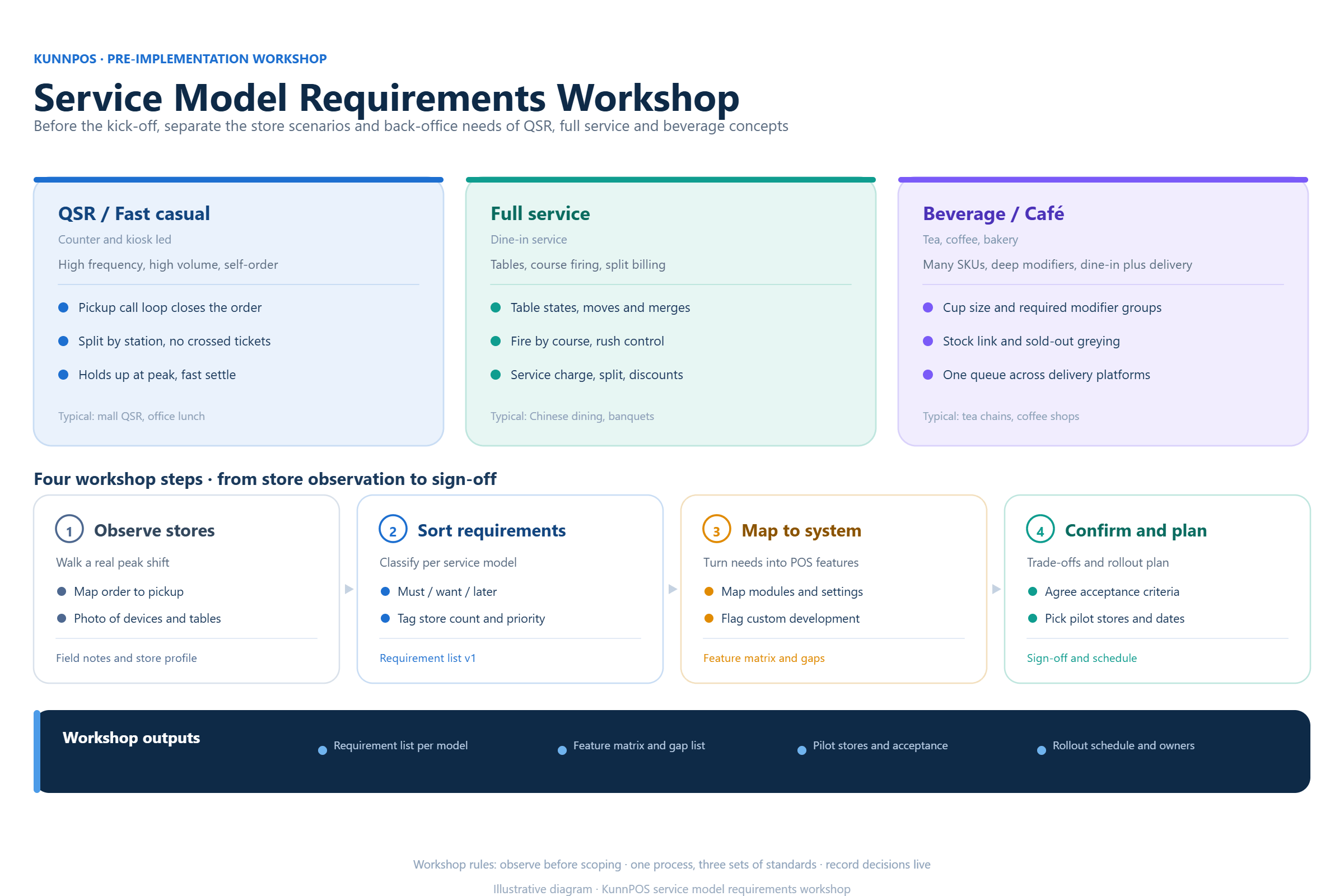
The right evaluation is a working session based on the service model. Ask KunnPOS to map one quick-service journey, one full-service table journey and any hybrid changeover, then document the menu rules, kitchen stations, payment methods, data requirements and rollout responsibilities for each. Separate confirmed product information from configuration, paid development, contract terms and items still awaiting verification.
12Frequently Asked Questions
13What is the difference between a quick-service POS and a full-service restaurant POS?
A quick-service POS prioritizes fast order entry, payment speed, pickup control and clear kitchen routing. A full-service POS adds table, seat, course, server and split-check context. Some platforms support both, but the menus, screens, permissions and hardware still need to be configured for each operating model.
14Can one restaurant POS support counter service and table service?
Often yes, when the platform supports distinct order types, layouts, menus and permissions. Test the changeover between modes and confirm that sales, inventory, customer and reporting data remain connected.
15Do restaurant POS systems include kitchen display and printing?
Some platforms include kitchen printing or kitchen display functions, while others provide them as optional modules or integrations. Confirm the stations, devices, ticket rules and support responsibility for the selected version.
16What should a restaurant test before choosing a POS?
Test a representative order for each service model, modifiers, kitchen routing, item availability, refunds, split payments, offline recovery, staff permissions, inventory changes and end-of-day reports. Use the same script for every vendor.
17Is KunnPOS suitable for both quick-service and full-service restaurants?
KunnPOS materials cover restaurant and beverage workflows across different operating scenarios. Suitability still depends on the selected configuration, hardware, local integrations, project scope and contract. Confirm the actual workflow before committing to a rollout.
18Conclusion
The best restaurant POS system is the one that follows the way your team serves guests. Quick-service operations need speed and order clarity. Full-service operations need table context, course control and flexible payment. Hybrid concepts need clean mode changes and shared reporting.
Define the service model, test the difficult moments and compare vendors with the same scorecard. If you are evaluating restaurant, beverage or hybrid POS workflows, KunnPOS can help map the requirements and confirm which items are standard, configurable, custom, contract-dependent or still under evaluation.