
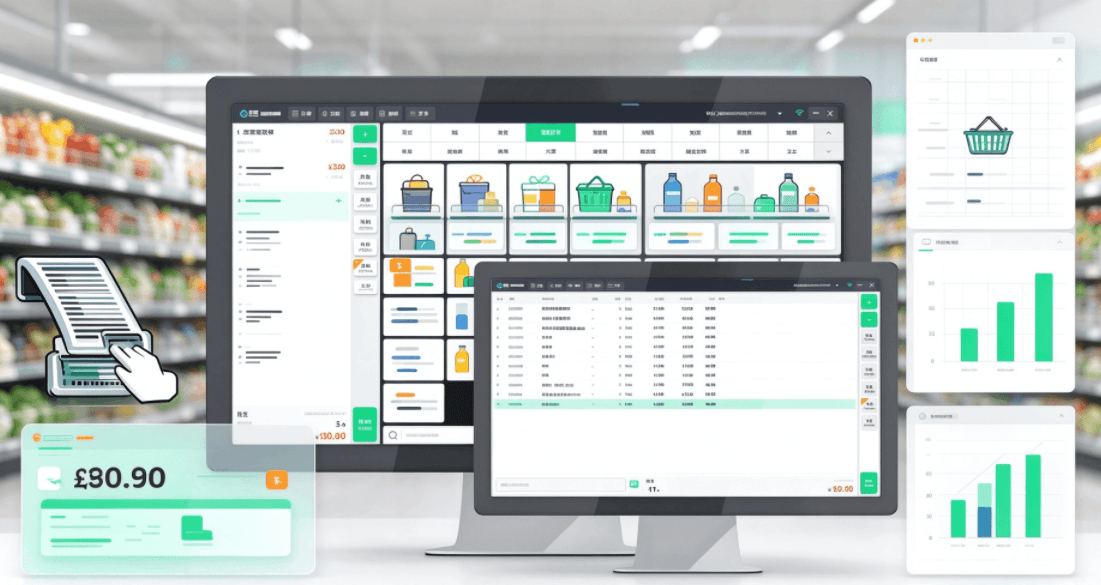
The seven functions that decide the choice — and six questions that separate the platforms
Contents
- [What a retail POS actually has to do]
- [Six questions to ask every vendor]
- [Shopify POS]
- [Square for Retail]
- [Lightspeed Retail]
- [Side by side]
- [Where KunnPOS fits]
- [How to decide in one afternoon]
- [FAQ]
Most retail POS comparisons produce a feature grid with every box ticked. The grid is useless, because every platform on it passes.
What actually separates retail systems is not the feature list. It is how they charge you as you add stores, where your data sits, and how deep the unglamorous functions go — inventory, purchasing, promotions and reconciliation. Those are the things that decide whether a retail system is still working at store ten, and they are exactly what a feature grid never shows.
This article compares three platforms retail operators shortlist most often — Shopify POS, Square for Retail and Lightspeed Retail — against the functions that matter in day-to-day retail, and against six questions you can put to any vendor.
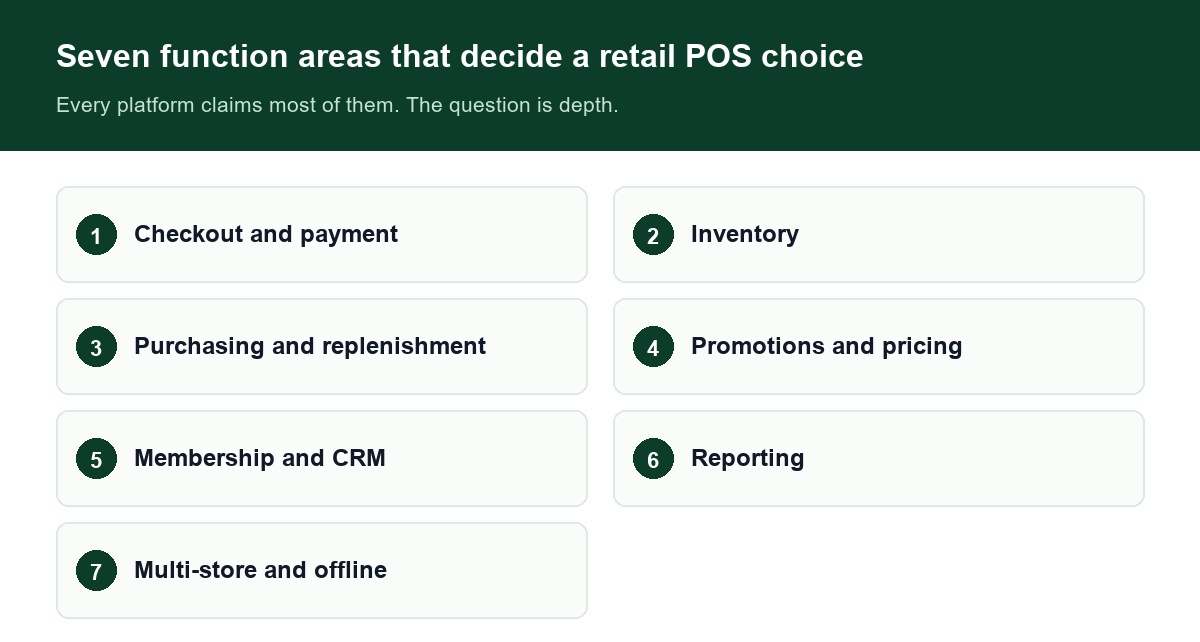
Every platform claims most of these seven. The question is depth.
Before the details:pricing, regional availability and product bundles in this category change frequently and differ by country. Confirm current terms with each provider before deciding. Nothing here should be read as a quote.
1What a retail POS actually has to do
Seven function areas cover the practical requirements of a retail operation. Every platform will claim most of them; the question is depth.
1. Checkout and payment
Barcode scanning at speed, split and mixed tender, refunds and exchanges, receipt printing, and multiple payment methods through your own acquirer. For an operator in more than one country, multi-currency and multi-tax-rate handling belong here, not in an add-on list.
2. Inventory
Real-time stock deduction on every sale, SKU depth, stocktake and reconciliation, low-stock alerts, batch or serial tracking where it is relevant, and store-to-store transfers. This is the functional area where retail platforms most often diverge.
3. Purchasing and replenishment
Supplier records, purchase orders, goods-in and goods-out, cost and margin tracking, and a workflow that turns a low-stock alert into a purchase order without a spreadsheet.
4. Promotions and pricing
Discount rules, buy-one-get-one, second-item offers, coupons, member pricing, scheduled campaigns — and the ability to combine these on a single order without the cashier doing arithmetic.
5. Membership and CRM
Member profiles, points, tiers, stored value, SMS or app campaigns, and repeat-purchase analysis — with the member data held in a system you can export from.
6. Reporting
Sales by hour, by store, by category and by item; margin analysis; best and slowest sellers; staff discount and void tracking; and export for the accountant.
7. Multi-store and offline operation
Central pricing and configuration, inter-store transfers, consolidated reporting — and a checkout that keeps working when the connection drops, syncing queued transactions afterwards.
2Six questions to ask every vendor
Write the answers down. Compare the answers, not the brochures.
1. What happens when the connection drops mid-sale?
Not the uptime percentage. Whether the till keeps scanning and printing, and whether queued transactions sync back without duplicates.
2. How does replenishment actually work day to day?
From low-stock alert to suggested order to purchase order to goods-in. Ask to see the workflow, not a stock report.
3. Can a promotion be built without a developer?
Have them build a second-item offer and a member price on the same order, in front of you. Count how long it takes and whether the cashier has to intervene.
4. How does cost scale by store and by terminal?
Per-store and per-terminal pricing multiplies. Understand the curve at your planned size, not today's.
5. Where does the data live, and who can export it?
On the vendor's cloud under their account, or on infrastructure you control. This decides your exit cost.
6. Which parts of your integration are included, and which are quoted separately?
Local acquirer, label printers, scales if you sell loose goods, e-commerce, tax reporting. Get the split in writing.
3Shopify POS
Shopify approaches retail from commerce, and its defining strength is the single view it gives a business that sells both online and in stores: one product catalogue, one customer record, one order history across channels. For a brand whose online store carries real revenue, that unification is the main reason to choose it.
Across the seven areas above, its centre of gravity is checkout, promotions and membership, joined to the online storefront. Inventory and purchasing depth sit further from that centre, which matters most to operators with dense SKUs and a real replenishment routine.
Strengths
- One catalogue and one customer record across online and in-store
- Broad app ecosystem and a well-documented developer platform
- Fast to launch, with low friction for a first store or a small group
Considerations
- Pricing and feature access are tiered, so the cost picture changes as you add capabilities
- Inventory and purchasing depth is not the platform's design centre
- Data is held on the vendor's platform
Best suited to:brands where online and physical retail are genuinely one business, and where the store operation is closer to specialty retail than to dense-SKU retail.
4Square for Retail
Square starts from payments and builds the retail software on top of it. Everything comes from one supplier — terminal, card processing, software — so a single store can be trading within days rather than weeks.
Its strength across the seven areas is at the front of the store: fast checkout, straightforward promotions and membership, and a hardware catalogue that covers most retail counters. Deeper purchasing and multi-store replenishment are further from the centre.
Strengths
- Quick to set up; easy to pilot in one store
- Payments and software billed together, which simplifies the first year
- Extensive hardware catalogue from the same provider
Considerations
- The payment relationship comes with the software
- Data sits inside the vendor's platform rather than infrastructure you control
- Cost structure is built to scale with volume and store count
Best suited to:independent retailers and small groups that want one vendor for payments and POS and expect to stay on that provider's payment rails.
5Lightspeed Retail
Lightspeed's centre of gravity is inventory and reporting depth, and it is the closest of the three to what a multi-site operator with a real purchasing function asks for. It is built for businesses managing stock across locations, and positioned accordingly, with contracts that suit operators who know their scale.
Across the seven areas, inventory, purchasing and multi-store reporting are the strong side. The trade-off is commercial: term contracts and quoted pricing, which makes an early comparison harder.
Strengths
- Inventory management and multi-location reporting are the design centre
- Suits operators with a genuine purchasing and replenishment function
- Contracts can be negotiated for larger groups
Considerations
- Annual or term contracts rather than month-to-month flexibility
- Quoted pricing makes early comparison harder
- Checkout-side extras should be verified in a demo rather than assumed
Best suited to:multi-location retailers with a strong inventory and reporting requirement, willing to work within a term contract.
The cost of any of these three at your planned store count is a separate question — see <a href="/blog/retail-pos-system-cost">how to calculate the three-year total</a>.
6Side by side
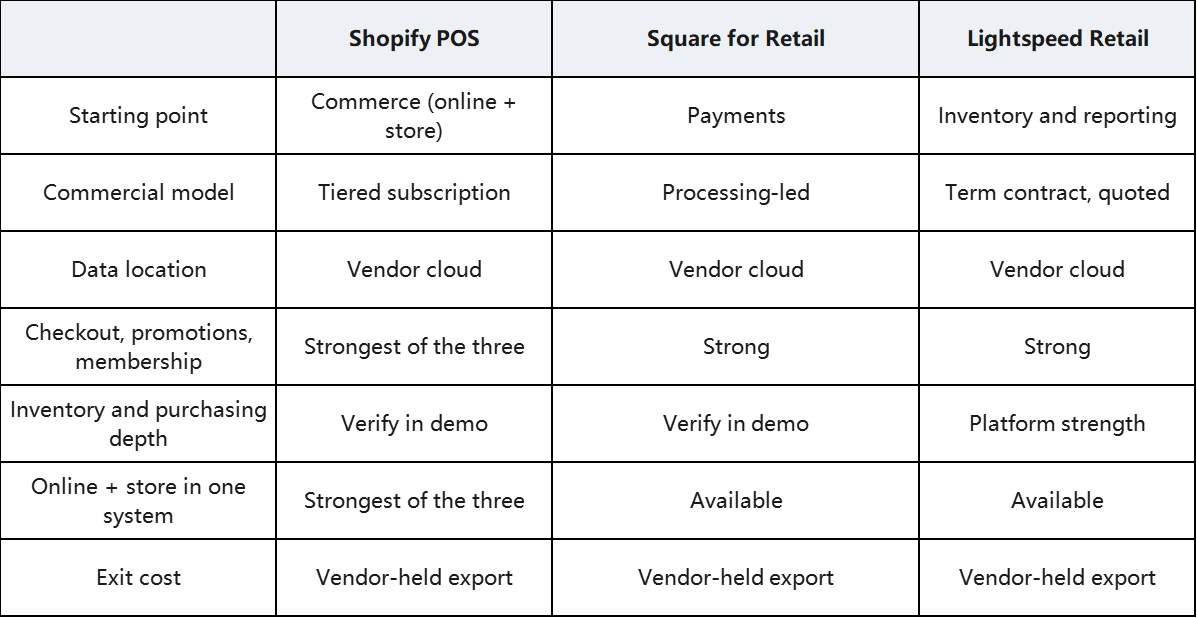
Treat the grid as intent, not as a ranking. Each product is solid within its own assumptions — and all three still keep your data on their servers.
7What the seven functions look like on a self-hosted system
Everything above is rented. KunnPOS is bought outright: one payment for the software, running on your own hardware, and you keep the code.
Against the seven function areas, that changes several practical answers:
- Checkout and offline. Scanning, product lookup and receipt printing run on the terminal, so a lane keeps working when the connection drops; queued transactions sync afterwards.
- Inventory and purchasing. Real-time stock deduction on every sale, stocktake, low-stock alerts, supplier records and purchase orders share one dataset with the till — no separate stock module to reconcile.
- Promotions. Discount rules, second-item offers, coupons and member pricing are configurable in the back office without a developer.
- Membership. Member profiles, points, tiers and stored value live in your own database, so the customer relationship is not held by a platform you rent.
- Reporting. Sales by hour, store, category and item, with margin and export — from your own data, not a vendor dashboard.
- Multi-store. Central pricing, inter-store transfers and consolidated reporting, at no per-store software fee.
- Data and exit. The database and the code are yours from day one, so there is nothing to negotiate on the way out.
We are not claiming this suits everyone. If you run one or two stores and want a single provider for payments, hardware and software, a subscription platform is a reasonable choice. If you are still deciding whether to change systems at all, start with <a href="/blog/retail-pos-outgrown">the seven symptoms of an outgrown retail POS</a>.
The one-time licence model suits operators planning a rollout — five, ten, fifty stores — who do not want their software cost to grow in step with their store count.
8The five-step retail vendor test
Run the same afternoon with every vendor, in this order:
1. Scan a basket of twenty items. Time it. Then ask the cashier to correct one line and issue a refund.
2. Build a promotion live. A second-item offer, plus a member price, on the same order.
3. Disconnect the network mid-sale. Watch what happens to that transaction.
4. Ask for the three-to-five-year cost at your planned store and terminal count.
5. Ask how a replenishment order is built from low-stock alert to goods-in, and what you receive if you leave — format, and by when.
Score them against your own answers. The highest score usually is not the one with the longest feature list.
9FAQ
What is a retail POS system?
A retail POS system is the checkout and store-management software that handles sales, payments, inventory, purchasing, promotions, membership and reporting. Modern retail POS systems also cover multi-store operations, e-commerce order flow and offline selling.
What should a retail POS system include as standard?
At minimum:barcode checkout with split and mixed tender, real-time inventory deduction, stocktake, low-stock alerts, purchasing with supplier records, configurable promotions, member management, sales and margin reporting, and an offline mode that keeps the till working when the network drops.
How much does a retail POS system cost for multiple stores?
Subscription models typically charge per store, and often per additional terminal, on top of payment processing — so cost scales directly with your store count. One-time licence models charge once for the software. Compare total cost over three to five years across every store you plan to open.
Can a retail POS system manage inventory across several stores?
It should:real-time stock deduction, store-to-store transfers, central purchasing and consolidated reporting across locations. Ask to see the transfer and replenishment workflow in the demo rather than a stock report.
Does a retail POS system work when the internet goes down?
It should. Offline mode keeps scanning, product lookup and receipt printing running on the terminal, with queued transactions syncing when connectivity returns. Verify it by disconnecting the network during a live sale.
Can promotions and member pricing be configured without a developer?
On a well-designed system, yes — discount rules, second-item offers, coupons and tier pricing should be configurable in the back office. Test it by asking the vendor to build a combined promotion live during the demo.
How long does a retail POS deployment take?
It depends on how much integration your operation needs — payment acquirer, label printers, scales if you sell loose goods, e-commerce, tax reporting and data migration. Get a written deployment plan with dates, a named engineer and an agreed definition of go-live before you sign.
10The short version
Scan a real basket and time it. Build a promotion live. Pull the network cable mid-sale. Price the system at the number of stores you plan to open, not the one you have today.
*Written by the KunnPOS Team. KunnPOS builds privately deployable POS and store-management software for retail and food & beverage businesses. Product names and trademarks mentioned in this article belong to their respective owners and are referenced for identification only. Pricing and feature availability change; confirm current details with each provider before deciding. [See how it works](/solutions/supermarket) or [request a quote](/pricing).